Installing Media Support Using the Medibuntu Repositories
Before you begin to work with the Medibuntu repositories, you should know what sort of software they contain. They provide two types of software packages. The first kind are free as in freedom (open source) but legally problematic in some countries. This is the reason you won't ever find this software in the official Ubuntu repositories. You can install and use these packages, but doing so is completely at your own risk. (You shouldn't be worried when using the software described in this chapter—there have been no known cases in which a Linux user has been prosecuted for installing and using such software.)
The second kind of software in the Medibuntu repositories isn't distributed using an open source license. You're free to install the software components that fall into this category. The only reason a popular program like Skype, which lets you make free phone calls over the Internet, isn't included in the default Ubuntu Netbook Remix repositories is that it uses a license that isn't open source. Because this software has its own license, you need to download and install it directly from the website of the company that created it. Programs such as Skype, Adobe Reader, and Google Earth are made available from the Medibuntu repositories for your convenience.
■ Note The Evince software offers all you need to read PDF files. According to some people, it's not as good as Adobe Reader. So, you must make your own choice!
To install the Medibuntu software, you need to add the Medibuntu repositories. The following procedure shows how to do this:
1. From the Administration tab, start the Software Sources program. Enter your password to get access to the administration utility, shown in Figure 6-1.
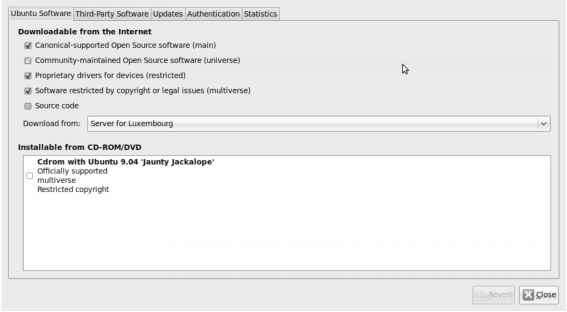
- Figure 6-1. You need the Software Sources program to add additional sites for installation of software.
2. On the Third-Party Software tab, click Add to add a new resource. As you can see in Figure 6-2, this opens a window in which you can enter the complete path of the installation source you want to add. Make sure it reads as follows:
http://packages.medibuntu.org/jaunty
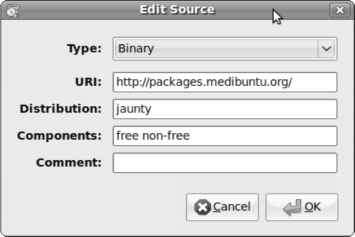
- Figure 6-2. Use the complete URI to identify the location where you want to download the Medibuntu software.
3. Click OK. The Medibuntu repositories are added, and you can install the software from them.
Continue reading here: The iPod and Other Portable Audio Players
Was this article helpful?