Ubuntu Server Administration
Install Xfce
To install Xfce from the command line interface, you could install any or all of the Xfce packages available from the Hardy Heron repositories. But the implicit objective is not to install a standard GUI desktop, but to install a GUI with a fairly minimal number of packages. The apt-cache search xfce command reveals 108 packages. As Xfce is built from the same toolkit as GNOME, GNOME-based GUI administrative tools can also be installed on that desktop environment. Be aware, several described...
PAM Configuration Files
This section continues with an analysis of the etc pam.d login configuration file, as it's an excellent example of how PAM standardizes the user authentication process. The first officially active line from etc pam.d login allows root logins at the login console if the terminal is listed in the etc securetty configuration file For more information, run the man pam_securetty command and review the etc securetty file. The next line prevents logins from users other than root, if the etc nologin...
Apache Global Settings
Global settings for the Apache web server are configured by default in the etc apache2 apache2.conf configuration file. Most numbers specified in this file are in seconds. This section describes the configured directives in that file. First, there's the ServerRoot directive, which specifies the top-level directory associated with Apache As Apache can spawn many additional processes for additional clients, some processes use the AcceptMutex directive (when set to flock or fcntl) to add the noted...
Format and Configure a RAID Array
As data is stored in each component of a RAID array, each partition must be formatted. The method is the same as that for formatting a partition for direct use. For example, to format the target partitions to the ext3 filesystem, I run the following commands sudo mkfs.ext3 dev sdb1 sudo mkfs.ext3 dev sdc1 For this example, I've set up a spare partition on a fourth SCSI drive, dev sddl, which I've also formatted. I can configure a RAID array in Ubuntu with the mdadm command. I configure the two...
The Gui Dhcp Server Configuration Tool


Ubuntu now has a GUI configuration tool available, courtesy of the gdhcpd package. As it's built with GTK+ libraries, it does not require many additional packages on the Xfce (or even the GNOME) desktop environments. I prefer to customize most services directly through their text configuration files. However, one value I find for GUI tools is how it helps newer administrators learn more about subject services. Before running the tool, back up the current version of the configuration file. For...
Upstart RCs Scripts and Services
If you haven't installed a new version of Linux lately, you might be in for a shock. There is no etc inittab configuration file in Ubuntu releases. Upstart, the replacement for the System V init program, is designed to meet the demands of the latest plug-and-play hotplug environments. During the boot process, Upstart is especially helpful with filesystems mounted on portable and network devices. NOTE This section assumes that you have some basic knowledge of services and runlevels thus, some of...
Major CUPS Configuration Files
CUPS does its good work based on the configuration files in the etc cups directory. Available configuration options go beyond what most administrators need. When the CUPS service starts, it loads the parallel printer module by default, as specified in the etc default cupsys configuration file. Yes, some computers including two of mine still have parallel ports. The basic functionality of other CUPS configuration files is described in Table 9-3. These files reflect the features available in CUPS...
Common Samba Commands
Some key commands associated with Samba are listed in Table 16-4. This table does not include commands that require extensive knowledge of Microsoft systems such as NT quotas or access control lists. Here are some examples of the use of some of these commands. The smbtree command, as shown in Figure 16-1, illustrates shared directories and printers from other Samba servers on a network. Note how it lists systems on workgroups (or domains) named WORKGROUP and MSHOME. The -U michael option adds...
The Basics of parted
Before you use parted to work with a partition, you need to know the device file of the drive to be configured. The easiest way to do this is with the following command, which in this case lists the partitions configured on the second SCSI or SATA drive You'll see the size of the noted drive, as well as partitions configured on that drive. The following code shows how I start the parted utility to open that second SCSI or SATA drive, dev sdb, to access the (parted) command line prompt Welcome...
From an NFS Client
If you're looking for the export list for a remote NFS server, just add the name (or IP address) of the NFS server. For example, the showmount -e nfsUbuntuServer command etc exports Option Description ro Allows read-only access rw Supports read write access sync Requires synchronous reads and writes async Allows reads, with data to be written held in memory secure Specifies communication through TCP IP ports below 1024 insecure Allows communication through TCP IP ports above 1024 wdelay Groups...
Device Drivers
There are a substantial number of settings associated with Device Drivers, more than just the hardware drivers available for Linux. Some settings in this area are divided into different categories, entitled Memory Technology Devices, Parallel Port Support, Plug and Play Support, Block Devices, Misc Devices ATA ATAPI MFM RLL Support, SCSI Device Support, and more. These categories are briefly explored here. Generic Driver Options These settings relate to firmware. Connector - Unified Userspace -...
Configure the X Server
There are two ways to manage screen resolution from the command line interface. First, there's the dpkg-reconfigure tool, which can be applied with the X server package, xserver-xorg, as follows sudo dpkg-reconfigure xserver-xorg sudo dpkg-reconfigure xserver-xorg Helps configure desktop profiles for different users Supports application docking in a system tray Allows an e-mail manager to notify on receipt of new e-mail Includes the network management tool Adds a meta-package that includes...
Remote Access via XDMCP
To configure access via XDMCP, you need a graphical login manager on both the client and the remote X server. To modify the GNOME graphical login manager, which is also used for the Xfce desktop environment, use the Login Window Preferences tool, Figure 13-10. Configure remote access available from the sudo gdmsetup command. As suggested by Figure 13-10, it's fairly easy to configure remote access using the login manager. Under the Remote tab, the Style drop-down text box can disable remote...
Partition Disks
Select the Partition Disks option from the expanded Main Menu. I've run this exercise on a virtual machine with 256MB of RAM. Make a note of the amount of RAM configured for your system. If the space configured doesn't match the steps shown, please feel free to deviate as needed. Be aware, there are more options under Partition Disks than I can clearly cover in a single section. Take the following steps 1. As shown in Figure 2-10, several options are available for partitioning method. If free...
Basic Configuration
While an Ubuntu system includes an NTP client by default, an NTP server requires a bit more. To install the NTP server, run the following command It includes several configuration files. The first is etc default ntp, which includes options associated with the NTP daemon, usr sbin ntpd. The default setting in this file is this The -g switch allows the NTP service to adjust the time once by over the panic threshold of 1000 seconds. That can help if you've accidentally picked the wrong time zone...
Using the GRUB Command Line
If the GRUB configuration file is accidentally erased, all is not lost. You could use a rescue mode as described in the next section. Alternatively, you could just enter the commands at the GRUB command line that appears when the GRUB configuration file is missing or misplaced. To follow along with this section, print out a copy of your GRUB configuration file, boot grub menu.lst, or refer to the file as described in the first half of this chapter. Minimal BASH-like editing is supported. For...
An NIS Client
NIS server systems already include the etc yp.conf configuration file and ypbind service for NIS clients. For systems in which you want to configure just an NIS client, the following command installs the needed packages You're prompted for the NIS domain name for the example discussed earlier, that name is example.org. As is done for the NIS server, the name you enter is included in the etc defaultdomain configuration file. The name can be reconfigured by directly editing that file or by...
Basic Xfce Tools
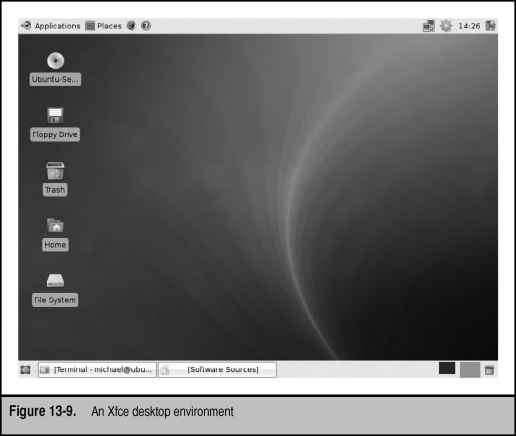
The Xfce desktop environment is similar to other GUI desktops, including GNOME, KDE, and even Apple Macintosh and Microsoft Windows. It includes a panel, a menu button, and icons. If you've installed the xubuntu-desktop meta-package described in the first part of the chapter, you've also installed a number of GNOME applications and utilities. Those of you who've used Xfce in the past may notice how it's evolving more toward GNOME. Figure 13-9 displays the Xfce desktop environment shown when the...
The Basics of fdisk
First, you need to know the device file of the drive to be configured. The easiest way to determine this is with the following command, which lists all connected drives if they're detected You'll see drive sizes, listed in order, as well as partitions configured on each drive. A sample output is shown in Figure 5-1. Note the partitions configured on the first two drives. The actual drive order varies by hardware portable drives such as those connected by USB and IEEE1394 devices appear after...
Install an LDAP Server
To install the packages required for an LDAP server, run the following command sudo apt-get install ldap-account-manager ldap-auth-config ldapscripts slapd ldap-utils migrationtools With dependencies, this command installs all the packages required to configure and manage an LDAP server for network authentication. If various Apache server and LDAP client packages are not already installed, it includes those packages as dependencies. The installation process requires answers to several questions...
Configure the X Server from the Command Line
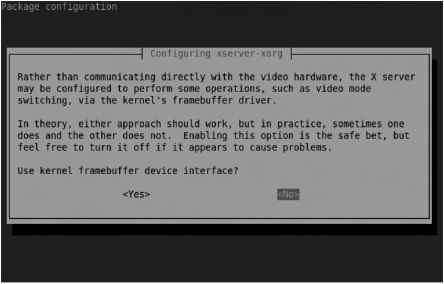
Those of you familiar with other Linux distributions may be familiar with the command line configuration tool for the X server. On older distributions, it was known as xf86config on the latest distributions, it's known as xorgconfig. The dpkg-reconfigure xserver-xorg command brings the administrator through a similar series of steps. It's a straightforward process to use the noted command to configure the X server. But before starting this process, back up the current X server configuration...
Simple Postfix Configuration
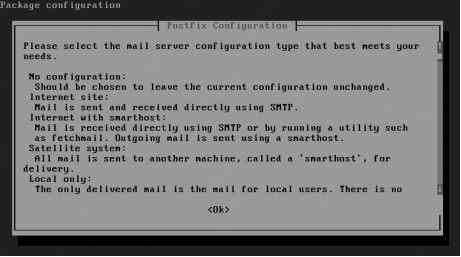
The first time the Postfix SMTP service is installed, you're prompted with questions during the installation process. For example, if you install Postfix with the following command, you're prompted to configure Postfix in a number of text-based screens. Figure 17-1 illustrates several choices, as described in Table 17-2. For the purpose of this chapter, press tab to highlight OK and then press enter to continue. Then select Internet Site to set up Postfix to send and receive e-mail with a...
Creating a Logical Volume
You can create a LV from the space configured for a VG using the lvcreate command. It's a straightforward command. The following command creates an LV on device dev volgroup1 logvol1 just substitute the name of your choice for volgroupl. sudo lvcreate -L 200M volgroupl -n logvoll There are many variations on the lvcreate command however, this usage is the most straightforward, as it specifies the size and name of the LV to be created. If you're in doubt about the space available in the VG, run...
Choose a Mirror of the Ubuntu Archive
Select the Choose A Mirror Of The Ubuntu Archive option from the expanded Main Menu. It should allow you to set up a connection to the mirror of your choice. Before you continue, review the list of available mirrors at https wiki.ubuntu.com Mirrors. Generally, a mirror geographically close to you is best, but the wiki does not include other relevant information such as the connection speed between the mirror and the Internet. For my own system, since I'm geographically close to the kernel.org...
Work with Landscape
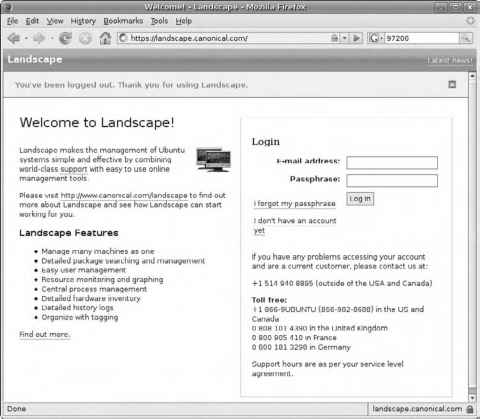
There are several basic tools associated with Landscape. But you need to know how to set up and register a client. You'll then learn how easy it is to monitor registered client systems. When you register with Landscape (even with a trial subscription), you should receive an e-mail confirmation, with an embedded link. Navigate to the associated URL and follow the instructions. Remember any included passphrase, as you'll need it when logging into Landscape, as shown in Figure 8-10. The passphrase...
Basic Kernel Concepts
It's helpful to review some kernel concepts before proceeding. Kernels can be configured as one big monolithic file or organized with a core and a group of modules. There are many different kernel-related packages available. Updated kernels built by Ubuntu and uploaded to appropriate repositories are fairly easy to use. The kernel numbering system, if you aren't familiar with it, can be confusing. (Linux geeks should recognize that some readers may be converting from either Microsoft or...
Upstart Scripts Replace etcinittab
If you remember the directives in the etc inittab configuration file, you'll recognize the contents of the other files in the etc event.d directory. As the hardware advantages of Upstart are essentially transparent to most users, this section focuses on how Upstart provides equivalent functionality to etc inittab. The first line in a standard etc inittab file specifies the default runlevel. To review, for Debian-based distributions including Ubuntu, the default runlevel as signified by the...
Check the CDROMs Integrity
If you have doubts about the CD or DVD you're using, the better time to check it was earlier in the process discussed back in the Download the ISO File Online section. But if you think you need to check the integrity of the media now, select the Check The CD-ROM(s) Integrity option from the expanded Main Menu. Be aware, if you're working with a mounted ISO file, say on a virtual machine, this option works equally well. NOTE Yes, the option and the title of this section does not follow the...
Use the Kickstart Configuration Tool
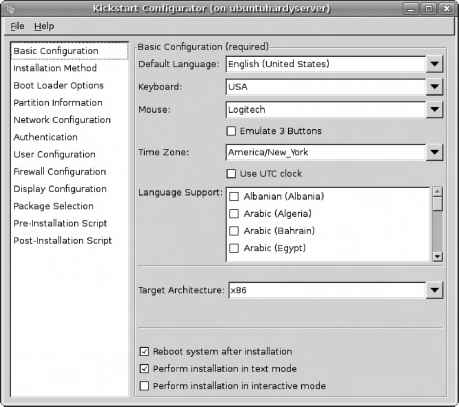
The Kickstart configuration tool is a graphical tool. If you've installed Kickstart without a GUI on an Ubuntu Server system, Kickstart can be run from a remote system with a GUI. Just take the following steps 1. On the Ubuntu server, run the ifconfig command to look for the local IP address. An excerpt of the output should appear similar to the following. (In my case, the IP address is 192.168.0.102. Your IP address will probably be different.) eth0 Link encap Ethernet HWaddr 00 0c 29 15 2a 4e...
The Installation CD Rescue Mode
Sometimes, you just need a rescue disk. The example of a missing GRUB configuration file is a good way to test the rescue mode available from the Ubuntu installation CD. For the purpose of this section, I run the following command to disable the GRUB menu sudo mv boot grub menu.lst home michael Now that GRUB is disabled, use the Ubuntu Server installation CD the ISO file described in Chapter 2 would work just as well. Boot from that CD, and when you get to the main Ubuntu Server installation...
Create a Samba Share
In this section, you'll examine how to configure a directory for sharing via the Samba server. This does not address any firewalls that may exist or network problems that may arise between server and client computers. This also assumes the gnome-system-tools, samba, and samba-common packages are installed, and your account has appropriate PolicyKit-based administrative privileges. Finally, the Shared Folders tool should be open in a GUI one method is by using the shares-admin command. As...
Configure Forwarding
A router is a key device in network communication. Linux systems are commonly configured as routers. Router configuration is an important skill for Ubuntu administrators. To configure Ubuntu as a router, all you need to do is configure a kernel variable. The following command confirms the default for IPv4 addressing, where Linux is not configured as a router If the local computer has two or more network cards, you can configure the system as a router. To do so, enable IP forwarding in etc...
The Very Secure FTP Service
Before configuring the vsFTP server, you need to install it. One method is with the following command A multi-threaded TFTP server for multiple connections An FTP server with an SSL option other FTP servers are preferred in the Ubuntu documentation An FTP server that uses Kerberos for authentication A complex FTP server with support for chroot directories, quotas, and more The standard TFTP server, sometimes used for terminal servers A two-part FTP server, including an authenticating front-end...
Special File Permissions
Permissions can be a risky business, but you need to give all users access to some programs. Setting full read, write, and execute permissions for all users on a Linux system can be dangerous. One alternative is setting the SUID and the SGID permission bits for a file. Specialized permissions are available, known as set user ID (S UID), set group ID (SGID), and the sticky bit. To review a file with SUID permissions, run the ls -l usr bin passwd command. The s that appears in the user execute...
More apt Commands
The apt-get command is just one of the many available apt- based commands. Others discussed in this section include apt-cache, apt-file, and apt-ftparchive. The apt-ftparchive command will be used to help to create a repository mirror later in this chapter. For a more complete list of apt- commands and options, see the Debian Linux apt HOWTO, available online from The simplest way to review available repositories for package information is with the apt-cache command. Assuming the local...
Add a Network Route
In Linux network configuration, the route command can be used to set up a default gateway for the network. Strictly speaking, a default gateway is the route used if the desired destination address does not exist elsewhere in the routing table. It's the gateway to the default IP address, 0.0.0.0. This output from the route -n command suggests no current default gateway address 192.168.0.0 * 255.255.255.0 U 0 0 eth0 Only a single host can be reached via this route. This entry was created by an...
Partial Authorization in sudoers
The super user configuration file is etc sudoers. This file regulates access to the sudo command. Don't open it in a text editor just yet. One way to review this file from the command line console is via the following command The first active line in this file sets Defaults. The following directive uses basic environment variables associated with the administrative account. The PATH for the administrative account is more extensive than is standard for most users. As such, authorized users who...
Install Ubuntu Server Step By Step
Finally, you get to see how Ubuntu Server Edition is installed, step by step, in Expert mode. I assume you know how to boot from the CD on your system. The same steps are required if you've set up an ISO file as a CD DVD on a virtual machine. 1. When you boot from the Ubuntu Server CD, you'll see a list of languages obscuring the screen. Select a language and press enter. 2. Once you see the menu shown in Figure 2-3, press F6 twice. In the pop-up menu that appears, highlight Expert Mode and...
Configuring iptables
Firewalls based on the iptables command is organized in chains of rules. Each rule in a chain is compared against each network packet. Every iptables command specifies information that can be found in a packet header. If a match is found, it also specifies the actions to take. Firewalls are a complex subject for more information, see Linux Firewalls (Third Edition Novell Press, 2005), by Suehring and Ziegler. The iptables command is organized in the following format iptables -t tabletype <...;
The Configuration File
Now review the configuration of the DHCP3 server. The default version of the configuration file, etc dhcp3 dhcpd.conf, does not configure any IP addresses. So if you try to activate this server without modifying the configuration file, it won't assign any IP addresses. This section reviews default configuration directives, along with the directives you need to add to set up a DHCP3 server on a standard private IPv4 network. NOTE Be aware of the semicolon ( ) at the end of each line a common...
How to Format a Filesystem
There are several commands available which can format a Linux filesystem. All are based on the mkfs command, which includes extensions that describe the filesystem format, such as mkfs.ext2, mkfs.ext3, and mkfs.reiserfs. Closely related is the mkswap command, which formats a Linux swap partition. Of course, the commands discussed in this section should not be run on a mounted filesystem. These commands are straightforward. The following command formats the dev sdbl partition to the ext2...
General Log Configuration
You can configure what syslogd records through the etc syslog.conf configuration file. As shown in this section, the default version of the file includes a set of rules for different facilities (if the corresponding packages are installed). If you make changes to this file, just remember to restart the syslogd daemon with the etc init.d sysklogd restart command. In the analysis of any log file, it's important to understand the levels of log messages available. Each level is known as a priority....
Quotas by Size and Inode
The edquota command can be used to create and customize disk quotas for users. This file edits the aquota.user or aquota.group file with the default editor. In this section, I'll edit quotas for user donna to restrict the amount of disk space she is allowed to use. I use the following command to edit user donna's quota configuration The -u switch is the default edquota command option if you want to edit the quotas of a group, the -g switch is appropriate. If the default editor is nano, you can...
Mware Server
This section describes one way to install VMware Server version 2.0 Release Candidate 2 on an Ubuntu Hardy Heron system. To download the required tarball package, navigate to www.vmware.com products server . The final release of VMware Server 2.0 was made available just as this book goes to print. The version number listed in this section has already changed. While the look and feel of VMware Server version 1.0.x is quite different from version 2.0.x, the installation process on Linux systems...
Create a Virtual Machine on KVM
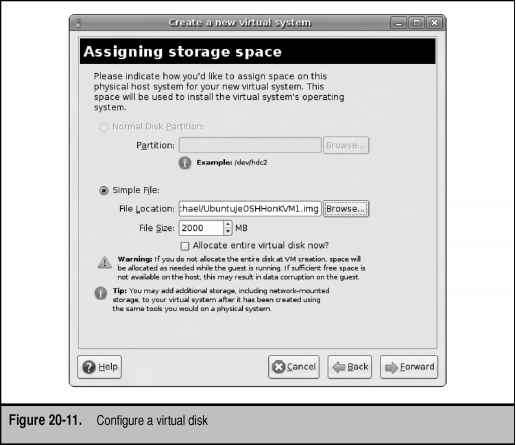
This section illustrates two methods to create a virtual machine, using KVM modules and utilities. I've tested these methods on my laptop system with a dual-core CPU. I use the Ubuntu JeOS system and ISO file described earlier for this purpose. One advantage of JeOS is that it requires relatively few resources. I illustrate the configuration of a virtual machine from the command line using the virt-install command as well as the GUI Virtual Machine Manager, which can be started with the...
Install DNS Packages
The default DNS packages are based on the Berkeley Internet Name Domain (BIND). Development of the basic BIND server continues under the auspices of the Internet Systems Consortium (ISC). There are several excellent alternative DNS services available. A search of the Hardy Heron repositories reveals nearly 200 DNS related packages, including several servers. One alternative that I like is the djbdns package from http cr.yp. to djbdns.html, even though the license does not support open...
Mirror Configuration
There are two basic methods to synchronize a local client to a remote repository. The rsync command is the traditional method associated with synchronizing local and remote groups of files. The apt-mirror command is more focused, and in my opinion, a better choice at least for the initial mirroring of the remote repository. The focus of this section is on apt-mirror you could subsequently use the rsync command to keep the repository created up-to-date. As the apt-mirror package is rarely...
Ipstat Printer Status
Another handy command is the lpstat -t command, which provides an overall view of configured printers and current status. If CUPS is running properly, the first message is Other excerpts are shown here. First, the default printer is listed system default destination anIPPprinter Next, configured print classes are shown, with the individual printer members of each class members of class FirstClass LaserJet-4L UbuntuPrinter members of class MyPrintClass SamplePrinter1 SamplePrinter2 The devices...
Download the ISO File from the Command Line
The advantage of downloading a large ISO file with certain commands is that such commands can handle interruptions in the download process. Specifically, the wget and curl commands can restart a download from the point of an interruption. If these commands don't already exist on a local Ubuntu system, they can be installed from packages of the same name using the following command These commands can then be used to download any file, based on a known URL. For example, if to download the first...
Configure with the Policy Kit GUI Tool
True Linux geeks work from the command line. But more Microsoft administrators are converting to Linux. For this audience, many, and perhaps most, readers learn more about tools based on newer concepts from the GUI. To start the GUI PolicyKit configuration tool, run the following command It opens the Authorizations tool, shown in Figure 10-9. Monitor local virtuaiized syst Manage local virtuaiized sys v gnome Change system time zon Change syctcm time Configure hardware clock j freedesktop...
The Policykit
The PolicyKit is relatively new for Linux. Originally developed to enable finer grained policies with respect to hardware, the PolicyKit has been extended to allow access from regular, normally unprivileged users. For the Hardy Heron release of Ubuntu, it's focused primarily on GUI-based administrative tools and utilities. It's intended to provide a finer-grained control than is realistic or possible using the sudo and PAM tools discussed earlier in this chapter. In fact, starting with the...
The Filesystem Hierarchy Standard
While there are variations, modern Unix Linux operating systems share several common directories. Some of these directories are dedicated for user files, drivers, kernels, logs, programs, utilities, and more. These directory categories, documented in the FHS, make it easier for users of other Unix-based operating systems to understand the basics of Linux. On every Linux distribution, the filesystem starts with the top-level root directory, also known by its symbol, the single forward slash ( )....
The Universal Resource Identifier URI
Perhaps the most important bit of CUPS configuration data is the URI, which is a superset (inverse of subset) of the more well-known URL. In other words, a URI includes regular HTTP and FTP URLs, as well as IPP interfaces such as this DeviceURI ipp 192.16 8.0.30 printers LaserJonHP Local URIs are based on printers directly connected to the local system, and networked URIs are based on printers accessed over a network. First, I present several examples of local URIs, which are almost...
Remote Access via VNC
VNC can help you administer remote systems. There are several options available for VNC servers and clients in the Ubuntu repositories. This section describes just one server, vino, and one client, vinagre. Both are built with GTK libraries, suitable for Xfce and GNOME. Install the vino package on a target server with the sudo apt-get install vino command.
Continue Installation Remotely Using SSH
You don't have to select the Continue Installation Remotely Using SSH option from the expanded Main Menu. If you do and I do so to demonstrate the capability , it should allow you to continue the installation process from another client on your local network. One of the problems with SSH-based installation is that it becomes more difficult to access to the console and system-related messages. If a break in the network connection occurs, you might even need to restart the installation. After...
Ubuntu File Structure for BIND
Before making any configuration changes for the BIND service, you need to understand the files available for the service. Most BIND data and configuration files are stored in the etc bind directory. But when the BIND service starts, it first refers to the etc default bind9 configuration file. It includes basic options for the service for more information, see the man page for the usr sbin named command. Default BIND configuration files are listed in Table 14-1 and are in the etc bind directory...
Troubleshoot a Network Connection
Troubleshooting a network connection can be a straightforward, step-by-step process. With the ping command, you can make sure current interfaces work on the local system, test connections to remote systems on the local network, and test connections to remote networks. When you run the ping command to a URL such as www.mhprofessional.com, be prepared to press ctrl-c to stop the ping, or run the command with the -c n switch. For example, the ping -c 4 www.mhprofessional.com command sends four...
Creating a User
To create a user in the Users Settings tool, click Add User. This opens the New User Account window shown in Figure 10-2. This window includes three tabs Account, User Privileges, and Advanced. Standard user information can be configured under the Figure 10-1. The Users Settings tool Figure 10-2. Basic account information Account tab, as described in Table 10-5. When you add a user, the changes can affect all four files of the standard authentication database etc passwd, etc group, etc shadow,...