Basic Xfce Tools
The Xfce desktop environment is similar to other GUI desktops, including GNOME, KDE, and even Apple Macintosh and Microsoft Windows. It includes a panel, a menu button, and icons. If you've installed the xubuntu-desktop meta-package described in the first part of the chapter, you've also installed a number of GNOME applications and utilities.
Those of you who've used Xfce in the past may notice how it's evolving more toward GNOME. Figure 13-9 displays the Xfce desktop environment shown when the xubuntu-desktop meta-package is installed. You'll note that it's much more complex than the minimal environment shown in Figure 13-1.
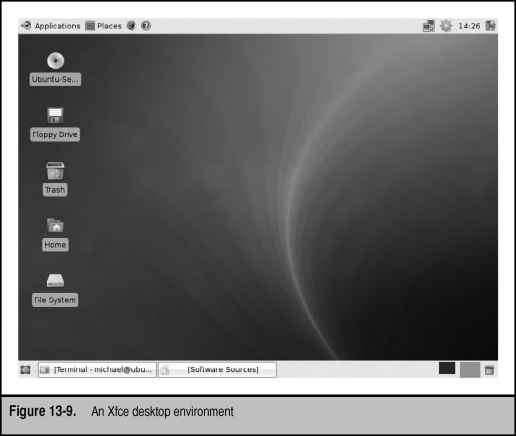
The panel at the bottom includes minimized applications. The panel at the top includes menus, as well as icons associated with the time, network configuration, and available updates. Icons are shown on the left side of the screen as well.
Older versions of the Xfce desktop (as well as the minimal Xfce desktop shown in Figure 13-1) supported access to the main menu with a right-click. Now you need to click the Applications button to access the menu. The Applications submenu options are summarized in Table 13-3.
Three other options are shown on the Applications menu. The Help option opens Xubuntu documentation in the default web browser. The About Xfce option provides more information on the current version and licensing of the desktop environment. The Quit option opens a window that allows you to switch users, log out, restart, shut down, suspend, or hibernate the system, if the hardware allows it.
Finally, the Places menu supports access to custom versions of the Thunar file browser, with access to the current user's home directory and more. Thunar is functionally similar to GNOME's Nautilus and KDE's Konqueror.
|
Submenu Option |
Description |
|
Settings |
Accesses settings, printer, login window, Smart Common Input Method (SCIM) options when installed |
|
Accessories |
Opens lower level applets such as the terminal and text editors |
|
Games |
Allows access to the games from the gnome-games package |
|
Graphics |
Supports access to graphical tools such as the GIMP |
|
Multimedia |
Takes the user to multimedia applications |
|
Network |
Accesses basic networking/Internet applications |
|
Office |
Opens applications associated with office suites |
|
System |
Accesses administrative tools |
|
Table 13-3. Xfce Desktop Applications Options | |
Post a comment