Knoppix Reference
Choosing and Installing a Linux Distribution
Chapter 7 Installing Linux 253 Choosing a Linux Linux at Work Other Distributions Getting Your Own Linux Distribution Finding Another Linux Understanding What You Need Downloading the Distribution Burning the Distribution to CD Exploring Common Installation Knowing Your Computer Hardware Upgrading or Installing from Scratch Dual Booting with Windows or Just Linux Using Installation Boot Options Partitioning Hard Partitioning with Disk Druid During Installation Partitioning with fdisk Tips for...
Using Your Camera as a Storage Device
Some digital cameras let you treat them like storage devices to manage pictures. By mounting a digital camera as a USB mass storage device, you can view, copy, delete, and move the pictures on your camera as you would files on a hard disk or CD (just at a lower speed). Table 20-3 is a partial summary of digital cameras that can be used as USB storage devices. For a current list, visit J , Y'f-rr At t Linux-USB Device Overview site (www. qbi k. ch usb devi ces i ndex. php), yOU can a so find the...
Adding More Software
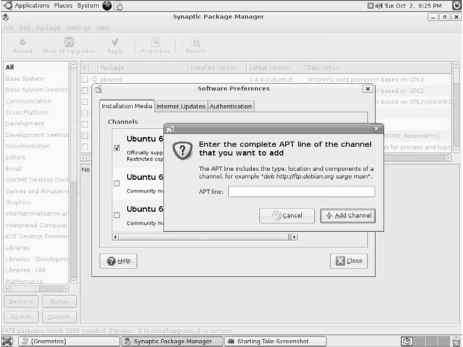
While Ubuntu manages to install around 2GB of applications from a single Ubuntu CD, it's still only 2GB. By contrast, other implementations with multiple CDs in a set can install up to about 7GB of applications. To add more software to Ubuntu, you can use the common Debian packaging tools (apt-get, aptitude, and even dpkg). You can also use the Synaptic Package Manager for adding and removing software packages, which provides a friendly graphical interface, a handy Search function to help you...
With gtkam and gPhoto2
With the gtkam window, you can download and work with images from digital cameras. The gtkam window is a front end to gPhoto2, which provides support for dozens of digital cameras in Linux. The gtkam window works by attaching a supported digital camera to a serial or USB port on your computer. You can view thumbnails of the digital images from the camera, view full-size images, and download the ones you select from the camera to your hard disk. fr. r you have a camera that saves images to a...
Using the Metacity Window Manager
The Metacity window manager seems to have been chosen as the default window manager for GNOME in Red Hat Linux because of its simplicity. The creator of Metacity refers to it as a boring window manager for the adult in you and then goes on to compare other window managers to colorful, sugary cereal, while Metacity is characterized as Cheerios. i' f'r f r To use effects in Fedora, your best solution is to use the Compiz window manager, as There really isn't much you can do with Metacity (except...
Boot to a Graphical Login
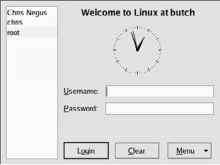
Most desktop Linux systems that are installed on your hard disk boot up to a graphical login screen. Although the X display manager xdm is the basic display manager that comes with the X Window System, KDE and GNOME each have their own graphical display managers that are used as login screens kdm and gdm, respectively . So chances are that you will see the login screen associated with KDE or GNOME depending on which is the default on your Linux system . - r '., When Linux starts up, it enters...
Getting Started with Commercial Games in Linux
How you get started with Linux gaming depends on how serious you are about it. If all you want to do is play a few games to pass the time, I've already described plenty of diverting X Window games that come with Linux. If you want to play more powerful commercial games, you can choose from the following Games for Microsoft Windows (Cedega 6.0) Many of the most popular commercial games created to run on Microsoft operating systems will run in Linux using Cedega. To get RPM versions of Cedega,...
Performing Audio File Conversion and Compression
There are many different formats for storing and compressing speech and music files. Because music files can be large, they are usually stored in a compressed format. While MP3 has been the compression format of choice, Ogg Vorbis is quickly becoming a favorite for compressing music in the open source community. Ogg Vorbis has the added benefit of not being encumbered by patents as MP3 is. Linux tools for converting and compressing audio files include SoX (Sound eXchange) A general-purpose tool...
Choosing a Text Editor
Hardcore UNIX or Linux users tend to edit files with either the vi or emacs text editor. These editors have been around a long time and are hard to learn but efficient to use because your fingers never leave the keyboard. The emacs editor has some GUI support, although it runs fine in a Terminal window. There are also GUI versions of vi and emacs that add menu and mouse features to the editors. These are GVim (gvim command in the vim-X11 package) and Xemacs (xemacs command) editors. The...
Mounting File Systems
Most of your hard disks are mounted automatically for you. When you install Fedora, Ubuntu, SUSE, or some other Linux systems, you are asked to create partitions and indicate the mount points for those partitions. (Other Linux installation procedures will expect you to know that you have to partition before beginning.) When you boot Linux, all Linux partitions residing on hard disk that are listed in your etc fstab file are typically mounted. For that reason, this section focuses mostly on how...
Creating Text Mode User Interfaces with SLang
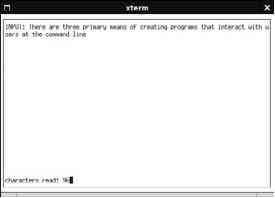
S-Lang, created by John Davis, is an alternative to ncurses for creating TUIs. In addition to providing screen manipulation and cursor control routines, S-Lang also consists of an embeddable S-Lang interpreter, a large library of built-in (intrinsic) routines that simplify certain parts of programming, and a variety of predefined data types and data structures. Listing 28-4 shows the same program as Listing 28-3, with appropriate updates to reflect use of S-Lang instead of ncurses. Reading...
Using the GCC Compiler
The GNU Compiler Collection (GCC) is by far the most dominant compiler (rather, the most dominant collection of compilers) used on Linux systems. It compiles programs written in C, C++, Objective-C, Fortran, Java, and Ada. This chapter focuses on the C compiler. GCC gives programmers extensive control over the compilation process. That process includes up to four stages preprocessing, compilation, assembly, and linking. You can stop the process after any of these stages to examine the...
Configuring DNS for Direct Delivery
For direct delivery to function, the SMTP service (TCP port 25) must be accessible to the outside world through a fixed name in DNS. This name will be in the form of an A (Address) record. A records allow DNS resolver processes to determine the IP address associated with a specific name and are used by most of the common protocols on the Internet. A typical DNS A record looks something like this bigserver.example.org IN A 10.0.12.16 The first parameter, bigserver.example.org, is the label, and...
Which Version Is Right for
Both Linspire and Freespire were built on the solid base of Debian Ubuntu Linux, the KDE desktop, and the OpenOffice.org office suite. With recent releases, the distributions have moved to embracing Ubuntu 7.04 (itself a Debian derivative) as their foundation, or base. Unlike many other Linux distributions, both come with a set of licensed commercial codecs for multimedia formats such as MP3, drivers, and other proprietary software. Although vendors provide such things for all varieties of...
Configuring the CUPS Server cupsdconf
The cupsd daemon process listens for requests to your CUPS print server and responds to those requests based on settings in the etc cups cupsd.conf file. The configuration variables in the cupsd.conf file are in the same form as those in the Apache configuration file (httpd.conf). Red Hat's Printer Configuration window adds access information to the cupsd.conf file. For other Linux systems, you may need to configure the cupsd.conf file manually. You can step through the cupsd.conf file to...
The Gnome Desktop
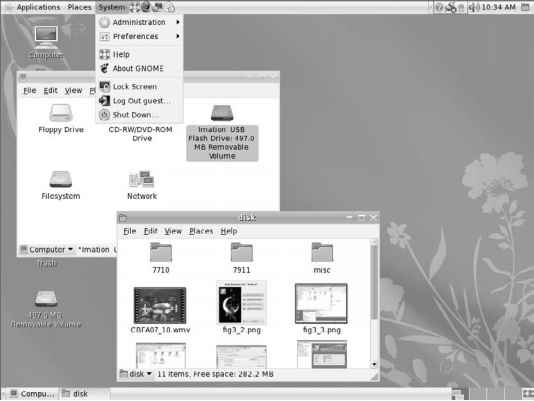
GNOME (pronounced guh-nome) provides the desktop environment that you get by default when you install Fedora, Ubuntu, or another Linux system. This desktop environment provides the software that is between your X Window System framework and the look-and-feel provided by the window manager. GNOME is a stable and reliable desktop environment, with a few cool features. The GNOME 2.18 desktop comes with the most recent version of Fedora. Recent GNOME improvements include advancements in 3D effects...
Effects with AIGLX
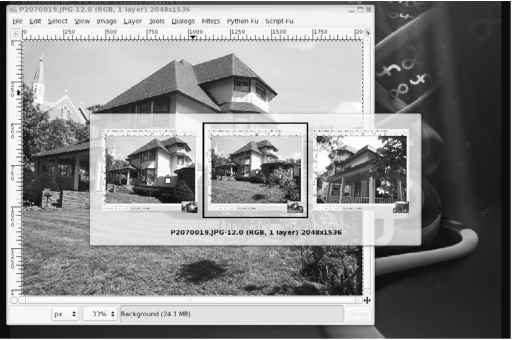
Several different initiatives have made strides in recent years to bring 3D desktop effects to Linux. openSUSE has the Xgl project (http en.opensuse.org Xgl), while Fedora has AIGLX The goal of the Accelerated Indirect GLX project (AIGLX) is to add 3D effects to everyday desktop systems. It does this by implementing OpenGL (http opengl.org) accelerated effects using the Mesa (www.mesa3d.org) open source OpenGL implementation. Currently, AIGLX supports a limited set of video cards and implements...
Using the Red Hat Printer Configuration Window

If you are using Fedora, RHEL, or other Red Hat-sponsored systems, you can use the Printer Configuration window to set up your printers. In fact, I recommend that you use it instead of CUPS Web administration because the resulting printer configuration files are tailored to work with Red Hat systems. To install a printer from your GNOME desktop in Fedora, open the Printer Configuration window by selecting System C Administration C Printing (with Fedora 8, select System C Printing) or as root...
Installing Software in Knoppix
Despite the fact that KNOPPIX includes a wide range of software applications, there may be some software package you want to use with it that isn't included. For installing software while you are running KNOPPIX from the DVD, you can use Synaptic. To start Synaptic, click the squished penguin on the KNOPPIX panel and select Utilities C Manage Software in KNOPPIX. The Synaptic window opens, displaying lists of installed packages. Here's what you do to install a package 1. Reload the package...
Text Processing with Groff
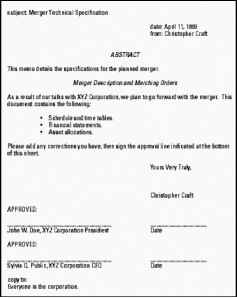
The nroff and troff text formatting commands were the first interfaces available for producing typeset-quality documents with the UNIX system. They aren't editors, but commands through which you send your text, with the result being formatted pages. The nroff command produces formatted plain text and includes the capability to do pagination, indents, and text justification, as well as other features. The troff command produces typeset text, including everything nroff can do, plus the capability...
Partitioning with Disk Druid During Installation
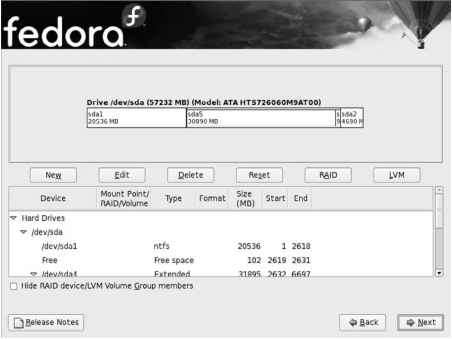
During installation, Fedora gives you the opportunity to change how your hard disk is partitioned using a tool called Disk Druid in fact, the name Disk Druid seems to be going away, but the partitioning tool remains the same . The Disk Druid screen is divided into two sections. The top shows general information about each hard disk. The bottom shows details of each partition. Figure 7-1 shows an example of the Disk Druid window. Partition your disk during Fedora installation from the disk setup...
Choosing a Window Manager
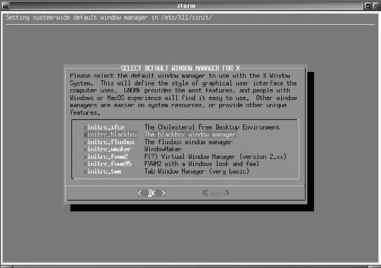
Window manager system-wide (in the etc X11 xinit xinitrc file). To use that tool, as the root user simply type xwmconfig from any shell on a Slackware system. Figure 3-15 shows an example of that screen. In Slackware, you can change window managers using the xwmconfig command. Select the window manager you want to try from that screen and select OK. That window manager will start the next time you run startx (provided you don't override it by creating your own .xinitrc file). Here are your...
Using the Nautilus File Manager
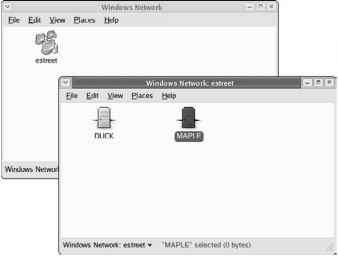
At one time, file managers did little more than let you run applications, create data files, and open folders. These days, as the information a user needs expands beyond the local system, file managers are expected to also display Web pages, access FTP sites, and play multimedia content. The Nautilus file manager, which is the default GNOME file manager, is an example of just such a file manager. When you open the Nautilus file manager window (for example, by opening the Home icon or another...
Configuring a Gnome Online Desktop
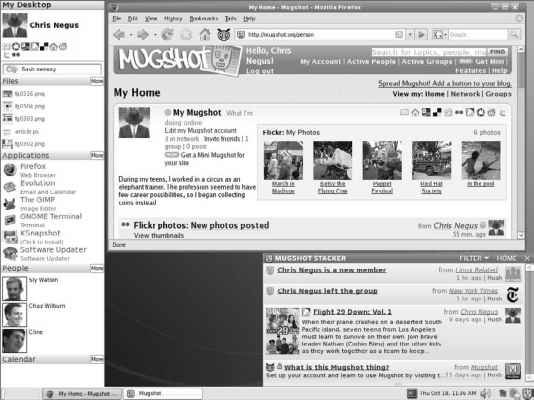
The GNOME Online Desktop project (http live.gnome.org OnlineDesktop) represents a new way of approaching desktop computing. It acknowledges that peoples' stuff (documents, digital images, videos, and so on) and activities (searches, blogging, e-mail, instant messaging, news feeds, and so on) are moving from the local hard disk to the Internet. The first experimental release of the GNOME Online Desktop was distributed with Fedora 8 near the end of 2007. However, because it is part of the GNOME...
Text Processing with TeXLaTeX
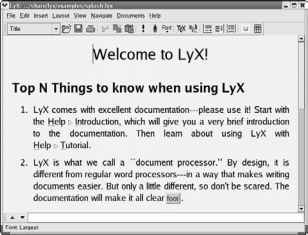
TeX (pronounced tech) is a collection of commands used primarily to produce scientific and mathematical typeset documents. The most common way to use TeX is by calling a macro package. The most popular macro package for TeX is LaTeX, which takes a higher-level approach to formatting TeX documents. TeX and LaTeX tools are contained in the tetex-latex package. TeX interprets the LaTeX macros from the LaTeX format file (latex.fmt). By default, the latex.fmt and plain.fmt format files are the only...
Video Conferencing with Ekiga
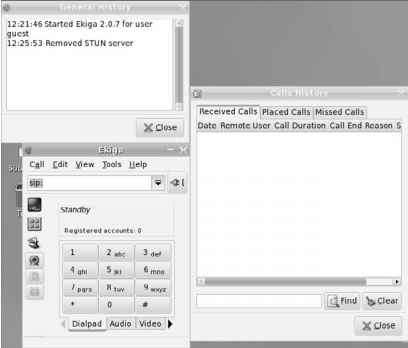
The Ekiga window lets you communicate with other people over a network through video, audio, and typed messages. Because Ekiga supports the H323 protocol a standard for multimedia communications , you can use it to communicate with people using other popular videoconferencing clients, such as Microsoft NetMeeting, Cu-SeeMe, and Intel VideoPhone. Ekiga does not support the NetMeeting shared whiteboard functions, just videoconferencing. To be able to send video, you need a Webcam that is...
Setting Up an NFS File Server
Instead of representing storage devices as drive letters (A, B, C, and so on), as they are in Microsoft operating systems, Linux systems connect file systems from multiple hard disks, floppy disks, CD-ROMs, and other local devices invisibly to form a single Linux file system. The Network File System (NFS) facility enables you to extend your Linux file system in the same way, to connect file systems on other computers to your local directory structure. An NFS file server provides an easy way to...
Setting Up Audio Cards
To start your quadraphonic wall of sound, you need to have a sound card in your PC. A sound card can be an add-in PCI (or even ISA) card, or it can be integrated on your motherboard. Your card will have a ton of uses from gaming to audio video playback. Having a multimedia system just isn't the same without sound. Fortunately, most modern PCs include a sound card, often of the integrated variety. In the rare case that one isn't included (or the slightly more common case where it isn't supported...
Converting Documents
Documents can come to you in many different formats. Search just some of the Linux FTP sites on the Internet and you will find files in PostScript, DVI, man, PDF, HTML, and TeX. There are also a variety of graphics formats. Table 21-2 is a list of common document and graphics conversion utilities. Document and Graphics Conversion Utilities Compressed PostScript format (The PostScript output is optimized to send to a printer on a low-speed line. This format is less efficient for images with a...
Manipulating Images with GIMP
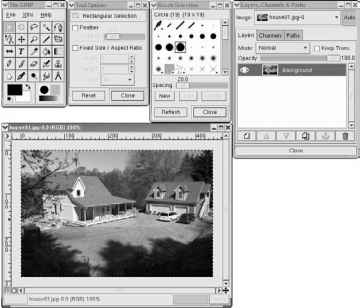
GIMP is a free software program for manipulating photographs and graphical images. To create images with GIMP, you can either import a drawing, photograph, or 3D image, or you can create one from scratch. You can start GIMP from the system menu by selecting Graphics O The GIMP or by typing gimp& from a Terminal window. Figure 21-13 shows an example of GIMP In many ways, GIMP is similar to Adobe Photoshop. Some people feel that GIMP's scripting features are comparable to or even better than...
Modifying Images with KPaint
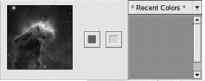
Using the KPaint window, a utility that comes with KDE, you can work with and convert images in several formats. Figure 21-15 shows an example of KPaint. Start KPaint from either the desktop (from most KDE desktops, select Graphics C Paint Program) or from a Terminal window ( usr bin kpaint&). Start with either a blank canvas or by opening an image in one of the supported formats (File C Open, browse for a file, and then click OK). Look in the usr share backgrounds directory for graphics to...
Securing Your Web Traffic with SSLTLS
You want to add security for your server, including your own certificates. Your data is important, and so is your capability to pass it along your network or the Internet to others. Networks just aren't secure enough by themselves to protect your communications. This section examines ways in which you can help guard your communications. Electronic commerce applications such as online shopping and banking are generally encrypted using either the Secure Socket Layer (SSL) or Transport Layer...
Creating an Image Gallery with Konqueror
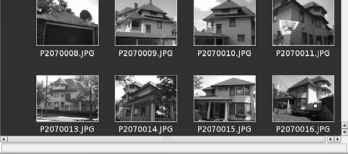
There's a neat feature in Konqueror that lets you create a quick image gallery. The feature takes a directory of images, creates thumbnails for each one, and generates an HTML (Web) page. The HTML page includes a title you choose, all image thumbnails arranged on a page, and links to the larger images. Here's how you do it 1. Add images you want in your gallery to any folder (for example, home chris Pictures). Make sure they are sized, rotated, and cropped the way you like before beginning....
Be extremely careful using the Remove All Partitions option Avoid using it at all if
On most multi-boot systems, you will want to select Automatically partition. Then select the Keep all partitions and use existing free space option and the Review (and modify if needed) the partitions created check box to make sure that you are using the correct portion of your hard drive. 9. Identify your network settings, including DHCP You use your network configuration for LAN (local area network) connections, such as when you are using a router between your cable or DSL connection and the...