Fedora Linux Secrets
Understanding the CUPS Configuration Files

You can learn a lot about the CUPS configuration files by examining the entries in various configuration files that the printer configuration tool creates when you set up a new print queue. The CUPS configuration files are in the etc cups directory. Consider the example of adding a new print queue named Office-ES640 for an Epson Stylus Color 640 printer that is connected to the parallel port of the PC. Here are the files that contain information about this print queue and the printer model etc...
Understanding How a Cable Modem Works

A box called a cable modem is at the heart of Internet access over the cable TV network. The cable modem takes digital data from your PC's Ethernet card and puts in an unused block of frequency (think of it as another TV channel, but instead of pictures and sound, this channel carries digital data). The cable modem places upstream data data that's being sent from your PC to the Internet in a different channel from that used for the downstream data that's coming from the Internet to your PC. By...
Linux Commands

This appendix presents alphabetically arranged reference entries for the most important Linux commands. The goal here is to provide you with an overview of all commands needed to manage files and directories, start and stop processes, find files, work with text files, and access online help. If you are looking for a command for a specific task, but don't know which command to use, you may find it helpful to browse through the commands by category. Table A-1 shows the Linux commands organized by...
Understanding Environment Variables
The shell and other Linux commands need information to work properly. If you type a command that isn't one of that shell's built-in commands, the shell has to locate an executable file (whose name matches the command you type). The shell needs to know which directories to search for those files. Similarly, a text editor, such as vi, needs to know the type of terminal (even if the terminal happens to be a terminal window in GNOME or KDE). One way to provide this kind of information to a program...
Determining Whether You Have Perl
Before you proceed with the Perl tutorial, check whether you have Perl installed on your system. Type the following command The which command tells you whether it finds a specified program in the directories listed in the PATH environment variable. If perl is installed, you should see the following output If the which command complains that no such program exists in the current PATH, this does not necessarily mean you do not have perl installed it may mean that you do not have the usr bin...
Writing a Simple Java Applet
The other model of a Java program is the applet that runs inside the appletviewer program or a Java-capable Web browser. Specifically, a Java applet is a class in the Java Abstract Windowing Toolkit (AWT). In an applet, you do not have to provide a main method. Instead, you provide a paint method where you place code to draw in an area of a window. You can use the applet model to implement GUIs and other graphical programs. For a Hello, World applet, I'll do the following Instead of displaying...
Figure 261 Running the Hello World Java Applet in appletviewer
Notice that appletviewer displays only the applet the rest of the text in the HTML document is ignored. However, the appearance is quite different in a Java-capable Web browser. To view the applet in a Web browser, start the Firefox Web browser and select File O Open File from the menu. From the Open File dialog box, go to the directory where you have the hello.html file and the HelloWorld.class file (for the applet). Then, select the hello.html file, and click Open. Firefox then renders the...
Disk Controller Types
The disk controller is the adapter card that acts as an intermediary between your PC's motherboard and one or more hard disk drives. Typically, you can connect up to two hard drives and two floppy drives to a single disk controller. The Small Computer System Interface (SCSI) controller is an exception to this norm you can connect as many as 7 or 15 SCSI devices (anything that has a SCSI interface, such as a disk drive, CD-ROM drive, tape drive, or scanner) in a series. Over the years, several...
Linux Standard Base
Linux has become important enough that there is now a standard for Linux called the Linux Standard Base, or LSB for short. LSB is a set of binary standards that should help reduce variations among the Linux distributions and promote portability of applications. The idea behind LSB is to provide application binary interface (ABI) so that software applications can run on any Linux (or other UNIX) systems that conform to the LSB standard. The LSB specification references the POSIX standards as...
Exporting a File System with NFS
Start with the server system that exports makes available to the client systems the contents of a directory. On the server, you must run the NFS service and also designate one or more file systems that are to be exported. To export a file system, you have to add an appropriate entry to the etc exports file. For example, suppose that you want to export the home directory and you want to enable the host named LNBP75 to mount this file system for read and write operations. You can do this by...
Running sed
The sed editor expects to read from the standard input and write to the standard output. You can provide a filename on the command line, but sed still writes the output to standard output. This means that sed does not change the file it edits. You can redirect the output to another file or to the original file, thereby changing that file. By default, sed applies each editing command globally to all lines in the file. You can, however, use line addresses or patterns to restrict the lines to...
Filtering Spam with Spam Assassin
Spam unwanted email can be a nuisance, especially if you get too many of these unwanted messages. They fill up your mailbox and take time to sort through. Instead of manually dealing with spam, you can use an automated tool called SpamAssassin written in Perl to automatically identify potential spam based on a number of rules. SpamAssassin examines the header and content of each email message and assigns a You can set up SpamAssassin to filter mail for an entire mail server as well as using it...
Learning the KDE Display Manager
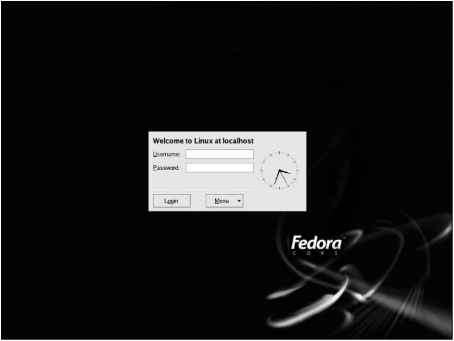
If you install only the KDE desktop or define the DISPLAYMANAGER variable in the etc sysconfig desktop file as KDE, the kdm program starts the X server for the local display and displays the graphical login window through which you log in to the system. Figure 9-3 shows the graphical login screen that you see when you run the kdm display manager. (To change to the KDE display manager, just add the line DISPLAY-MANAGER KDE to the etc sysconfig desktop file.) Figure 9-3 Graphical Login Screen...
Setting Up a Cable Modem Connection
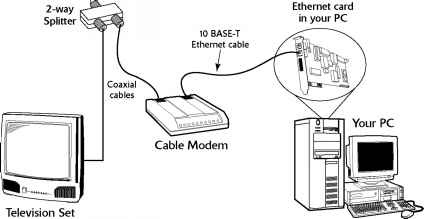
To set up cable modem access, your cable TV provider must offer high-speed Internet access. If the service is available, you can call to sign up. The cable companies often have promotional offers such as no installation fee or a reduced rate for three months. Look for these offers. If you are lucky, they may have a promotion going on just when you want to sign up. The installation is typically done by a technician who splits your incoming cable into two one side goes to the TV and the other to...
Table 214 Common File System Configuration Options
Enables Linux to read from the ADFS the Acorn Disc Filing System the standard file system of the RiscOS operating system that runs on Acorn's ARM-based Risc PC systems and the Acorn Archimedes systems. Answer y if you want Linux to read from ADFS partitions on hard drives and from ADFS floppy disks. Enables support for the Amiga Fast File System (AFFS), the file system used by Amiga systems since AmigaOS version 13 (34.20). Answer y if you need to read from and write to an Amiga FFS partition...
Raster Scan Display
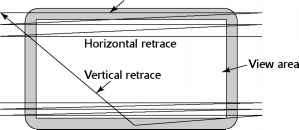
All video cards operate on the same principle They store an image in video memory (also called video RAM or VRAM for short) and generate the appropriate signals to display the image on the monitor's screen. The monitor is the physical device that contains the display screen where the graphic and text output appears. The display screen is typically a phosphor-coated glass tube on which an electron beam traces the output image. On laptop computers, the display screen is a liquid crystal display...
Supported Ethernet Cards
To set up an Ethernet LAN, you need an Ethernet card for each PC. Linux supports a wide variety of Ethernet cards for the PC. Table D-1 lists the supported Ethernet cards and their Linux drivers. The table includes wireless Ethernet cards as well as PCMCIA Ethernet cards. The driver name is useful when you load the Ethernet driver module log in as root and type modprobe drivername to load a driver module . Table D-1 Ethernet Cards and Their Linux Drivers 3Com 3C359 Tokenlink Velocity XL PCI...
Using sysctl to View and Set Kernel Parameters
As the entry for proc sys in Table 20-11 explains, you can change kernel parameters by writing to files in the proc sys directory. This is one way to tune the system's performance. Linux also comes with the sbin sysctl program that enables you to read and write kernel parameters without having to overwrite files manually in the proc sys directory. In Chapter 13, you encounter an instruction that asks you to log in as root and enable IP forwarding in the kernel by typing the following command...
Plotting Data with Gnuplot
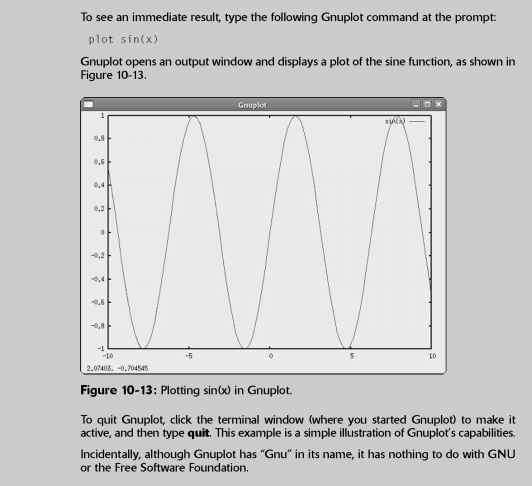
Gnuplot is an interactive plotting utility. You need to run Gnuplot under the X Window System because it uses an X window as the output device. Gnuplot is a command-line-driven program it prompts you and accepts your input commands. In response to those commands, Gnuplot displays various types of plots. The output appears in an X window. To install Gnuplot, log in as root, mount the DVD-ROM, and type the following commands in a terminal window change media cdrom to media cdrecorder if you are...
Ethernet Cables
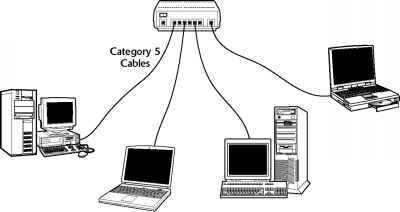
The original Ethernet standard used a thick coaxial cable, nearly half an inch in diameter. That wiring is called thickwire or thick Ethernet, although the IEEE 802.3 standard calls it 10Base5. That designation means several things The data-transmission rate is 10 megabits per second (10 Mbps) the transmission is baseband (which simply means that the cable's signal-carrying capacity is devoted to transmitting Ethernet packets only) and the total length of the cable can be no more than 500...
Mounting DOS Floppy Disks
Just as you mount a DOS hard disk partition on the Linux file system, you can also mount a DOS floppy disk. You must log in as root to mount a floppy, but you can follow the steps shown in the latter part of this section to set up your system so that any user can mount a DOS floppy disk. You also need to know the device name for the floppy drive. By default, Linux defines the following two generic floppy device names dev fd0 is the A drive (the first floppy drive). dev fd1 is the B drive (the...
Testing the Sound Card
To test the sound driver, you should try playing a sound file. A good way to do this is to insert an audio CD into your CD DVD-ROM drive, and play a sound track. See the section Playing Audio CDs for more information about various CD Player applications. If you don't have an audio CD handy, you can use the Helix Player to open and play a sound file. Helix Player can play many types of sound files, including MP3, OGG, and Windows WAV. You will find many OGG and WAV sound files which usually have...
Understanding IP Addresses
When you have many computers on a network, you need a way to identify each one uniquely. In TCP IP networking, the address of a computer is known as the IP address. Because TCP IP deals with internetworking, the address is based on the concepts of a network address and a host address. You might think of the idea of a network address and a host address as having to provide two addresses to identify a computer uniquely Network address Indicates the network on which the computer is located Host...
Setting Up a DSL Connection

To get DSL for your home or business, you have to contact a DSL provider. In addition to your phone company, there are many other DSL providers. No matter who provides the DSL service, some work has to be done at your central office the place where your phone lines connect to the rest of the phone network. The work involves connecting your phone line to equipment that can work with the DSL modem at your home or office. The central office equipment and the DSL modem at your location can then do...
To restart Apache httpd after making changes to configuration files type
The Apache HTTPD server's operation is controlled by the directives stored in the httpd.conf file located in the etc httpd conf directory as well as separate .conf files located in the etc httpd conf.d directory. The directives in these configuration files specify general attributes of the server, such as the server's name, the port number and the directory in which the server's directories are located. The configuration directives also specify information about the server resources the...
Running Commands in the Background or in Virtual Consoles
When using MS-DOS, you have no choice but to wait for each command to complete before you enter the next command. (You can type ahead a bit, but the MS-DOS system can hold only a few characters in its internal buffer.) Linux, however, can handle multiple tasks simultaneously. The only problem you may have is that the terminal or console is tied up until a command completes. If you work in a terminal window and a command takes too long to complete, you can open another terminal window and...
Running Microsoft Office in Linux with Cross Over Office
You probably have Windows and Microsoft Office installed on your PC. When you decide to install Linux on the PC, you can, for a price, continue to run the key Microsoft Office applications from the GNOME or KDE desktop. The convenience of running Microsoft Office in Linux comes in the form of a commercial product called CrossOver Office. CrossOver Office, from CodeWeavers, is a software package that enables you to install your Microsoft Office applications (all versions of Office, including...
Configuring Servers to Start Automatically at Boot Time
Although you can start, stop, and restart servers manually by using the scripts in the etc rc.d init.d directory, you have to set up symbolic links in the scripts for an appropriate run level. For example, to start the DNS server named in run level 5, you need an S script in the run level 5 directory ( etc rc.d rc5.d). Furthermore, that S script should be a symbolic link to the etc rc.d init.d named file. You set up such symbolic links to configure servers to start automatically at boot time....
Scheduling Recurring Jobs
Although at is good for running commands at a specific time, it's not useful for running a program automatically at repeated intervals. You have to use crontab to schedule such recurring jobs, also called cron jobs because they are processed by the cron daemon (crond). You need to do this, for example, if you want to back up your files to tape at midnight every day. Two files control who can schedule cron jobs using crontab etc cron.allow contains the names of the users who may submit jobs...
Viewing Process Information
Every time the shell acts on a command that you type, it starts a process. The shell itself is a process so are any scripts or programs that the shell executes. Examples of such programs are the Metacity window manager and Nautilus graphical shell in GNOME. You can use the ps command to see a list of processes. When you type ps ax, for example, Bash shows you the current set of processes. Following is a typical report displayed when you enter the ps ax command in a terminal window. (I also...
Drawing Figures with xfig
The xfig program is an interactive drawing program that runs under X and can generate encapsulated PostScript files suitable for inclusion in documents. To use xfig, you need to install three RPM files first transfig and xpdf RPMs and then the xfig RPM. To install xfig, log in as root and follow these steps 1. Mount the DVD-ROM. Insert the DVD-ROM and wait for it to be mounted (or type mount media cdrom to mount the DVD-ROM). Then, type the following command to install the transfig program cd...
Understanding Pluggable Authentication Modules
A Pluggable Authentication Module (PAM) performs the actual MD5 encryption, described in the Learning the Role of Shadow Passwords section. PAM provides a flexible method for authenticating users on Linux systems. Through settings in configuration files, you can change the authentication method on the fly, without having to actually modify programs, such as login and passwd, which verify a user's identity. Linux uses PAM extensively, and the configuration files are in the etc pam.d directory of...
Trying an Existing man Page
Before you write a man page, look at an existing man page. A brief example is the man page for zless. Figure 11-5 shows the man page for zless in a terminal window. zless - file perusal filter for crt viewing of compressed text Zless is a filter which allows examination Df compressed or plain text files one screenful at a time on a soft-copy terminal. It is the equivalent of setting the environment variable 1ESS0PEN to Igzip -cdfq )ts, and then running less. However, enough people scorn to...
Sound Cards or Chipsets Ygy
NeoMagic MagicMedia 256AV and 256ZX Oak Technology Mozart Philips H3600 PDA RME Digi32, Digi32Pro, Digi 32 8 SEK'D Prodif 32 96, Prodif Gold RME Digi96, Digi96 8, Digi96 8 PRO PST PAD RME Hammerfall DSP Digiface Multiface 9632 9652 S3 SonicVibes Best Union Miss Melody S3 Sound Pine Schubert 32 PCI Turtle Beach Daytona Tascam USB audio MIDI US 122 224 428 Trident 4D-Wave DX NX Aztech PCI 64-Q3D, PCI 288-Q3DII Best Union Miss Melody 4DWave PCI Chic Technology True Sound 4D Wave-DX NX HIS 4DWave...
Setting Up Multiport Serial Boards in Linux

If you plan to support a small business with a Linux PC and dumb terminals (terminals are cheaper than complete PCs, although you can also use old PCs as terminals), you want more than two serial ports. With another serial board, the PC can support four serial ports. If you want more than four serial ports, you have to buy special serial I O boards known as multiport serial boards. These boards typically support anywhere from 4 to 32 serial ports. The serial ports share one IRQ, but each port...
POSIX Compliance
Linux is designed to comply with IEEE Std 1003.1 1996 Edition (POSIX). This standard defines the functions that applications written in the C programming language use to access the services of the operating system for tasks ranging from opening a file to allocating memory. On March 8, 1996, the Computer Systems Laboratory of the National Institute of Standards and Technology (NIST), a U.S. government agency, confirmed that Linux version 1.2.13, as packaged by Open Linux Ltd., conforms to the...
Serial Line Internet Protocol
SLIP originated as a simple protocol for framing an IP packet an Internet Protocol packet that consists of an IP header (which includes the source and destination IP addresses), followed by data (the data sent from source to destination). In RFC 1055, A Nonstandard for Transmission of IP Datagrams over Serial Lines SLIP, (June 1988), J. L. Romkey describes SLIP. As the title of RFC 1055 suggests, SLIP is not an official Internet standard it's a de facto standard. SLIP defines two special...
Printing the CUPS Way
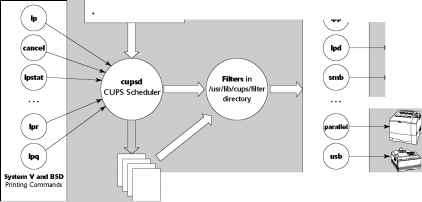
On a multitasking and multiuser system such as Linux, a better way to print is to spool the data and schedule the printing send the output to a file, and have a separate process send the output to the printer. That way, you can continue with your work while the printing takes place in the background. In addition, if your system has more than one user, everyone can print on the same printer, without worrying about whether or not the printer is available the background printing process can take...
Understanding the etcpasswd File
The etc passwd file is a list of all user accounts. It's a text file, and any user can read it no special privileges are needed. Each line in etc passwd has seven fields, separated by colons ( ). Here is a typical entry from the etc passwd file naba x 500 10 Naba Barkakati home naba bin bash Figure 12-4 uses this typical entry to explain the meaning of the seven fields. Login shell Home Directory User information (optional) Encrypted password (x means password is stored in etc shadow) User name...
Setting Up a PPP Server
The preceding sections describe how your Linux PC can establish a PPP link with another system that offers PPP service. After a PPP link is set up, both ends of the PPP link behave as peers. Before a PPP link is established, you can think of the end that initiates the dial-up connection as the client because that system asks for the connection. The other end provides the PPP connection when needed, so it's the PPP server. If you want to enable other people to connect to your Linux PC by using...
Floppy Disks in Linux
Chapter 12 describes several ways to access MS-DOS floppy disks under Linux you can mount the floppy and use Linux commands, or use the mtools utility programs to read from or write to the floppy. You also can create a Linux file system on a floppy disk. In fact, you'll find Linux file systems on the boot and root floppies that you use to install Linux. Formatting and creating a Linux file system on a floppy is a straightforward process. To format a 3.5-inch high-density floppy in the A drive,...
Configuring XOrg X11 Using systemconfigdisplay
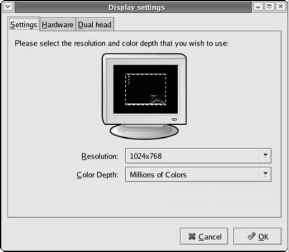
Fedora Core includes a GUI utility called system-config-display, written in the Python programming language, that enables you to configure X. The system-config-display utility provides a convenient way to configure X through a GUI that itself uses X. To run it, type system-config-display at a shell prompt or, if you are already on the GNOME desktop, select Desktop O System Settings O Display from GNOME's top panel. The utility probes the monitor and video card. Then it starts X (if X is not...
Generating Digital Certificates
To support SSL, the Apache Web server needs a public-private key pair and a digital certificate with its public key. You can perform these tasks by using the make command and Makefile in the etc httpd conf directory. Before you can use Makefile, you have to remove the keys and certificate that were generated during Apache installation. To remove the key and certificate, type the following commands while logged in as root cd etc httpd conf rm ssl.key server.key rm ssl.crt server.crt Next,...
Getting Star Office
StarOffice is another commercial office applications suite it was created by StarDivision of Hamburg, Germany, and purchased by Sun Microsystems in 1999. StarOffice is a cross-platform solution it runs on Linux, Windows 95 98 Me NT 2000 XP, Sun Solaris SPARC, and Sun Solaris x86. Also, StarOffice is available in several languages English, French, German, Spanish, Italian, and Swedish. StarOffice is a full-featured office productivity suite. Here's what StarOffice 7 Office Suite includes...
Writing a Sample makefile
You can write a makefile easily if you use GNU make's predefined variables and its built-in rules. Consider, for example, a makefile that creates the executable xdraw from three C source files (xdraw.c, xviewobj.c, and shapes.c) and two header files (xdraw.h and shapes.h). Assume that each source file includes one of the header files. Given these facts, here is what a sample makefile might look like Use standard variables to define compile and link flags Define the target all all xdraw OBJS...
Showing the Current Directory in the Shell Prompt
Note that you can display the current directory in the shell prompt. The Bash shell uses the value of the environment variable PS1 as the primary prompt. Another variable, PS2, functions as the secondary prompt when a command requires further input from the user. You can view these variables with the echo command (for example, type echo PS1 to view the setting of PS1).
Taking Stock of GNOME
Although what you see of GNOME is the GUI, there is much more to GNOME than the GUI. To help you appreciate it better, note the following points and key features of GNOME GNOME is officially pronounced guh-NOME, but many people pronounce the word as NOME. Note that guh-NOME stems from guh-NU, the way people pronounce GNU. The latest GNOME release is 2.x, also known as GNOME 2 for short.
Accessing a Digital Camera
Most digital cameras can connect to the Universal Serial Bus (USB) port. If you have such a camera, you can access its storage media (compact flash card, for example) as a USB mass storage device, provided your camera supports USB Mass Storage. To access the images on your USB digital camera, use the following steps 1. Read the camera manual and use the menu options of the camera to set the USB mode to Mass Storage. If the camera doesn't support USB Mass Storage, you cannot use this procedure...
Configuring for the First Time with firstboot
If you are booting Fedora Linux for the first time after installation, a server named firstboot runs and displays a welcome screen about setting up Linux. The firstboot server takes you through date and time setup, and gives you a chance to install any additional CDs. If the screen goes dark and there is no activity, the first-time configuration utility may be having trouble starting the X Window System. Unfortunately, you cannot proceed without fixing this problem. Sometimes the graphical...
Exploring the proc File System
You can find out a great deal about your Linux system by consulting the contents of a special file system known as proc. Knowing about the proc file system is useful because it can help you monitor a wide variety of information about your system. In fact, you can even change kernel parameters through the proc file system and thereby modify the system's behavior. The proc file system is not a real directory on the disk but a collection of data structures in memory, managed by the Linux kernel,...
Removing an RPM
You might want to remove (uninstall) a package if you realize you don't really need the software. For example, if you have installed the X Window System development package but discover you are not interested in writing X applications, you can easily remove the package by using the rpm -e command. You need to know the name of the package before you can remove it. One good way to find the name is to use rpm -qa in conjunction with grep to search for the appropriate RPM file. For example, to...
Learning the Basics of sed Commands
All sed commands have the following general form The parts shown in square brackets are optional. The command is an editing command (similar to those for the ed editor) that specifies the action sed takes on a line. The address specifies the lines to which the commands apply. The exclamation mark ( ) applies the command to all lines that do not match the address. The arguments are needed by some editing commands, such as the w or r command, that read a file for which you have to provide the...
Proprietary Cdrom Drives
Although the ATAPI and SCSI CD DVD drives fall into neat categories and work well in Linux, the situation is much more confusing when it comes to older CD-ROM drives with a proprietary interface. Following are two of the biggest sources of confusion Some vendors, such as Creative Labs (of SoundBlaster fame), have sold CD-ROM drives with all types of interfaces ATAPI, SCSI, and proprietary interfaces on a sound card. Thus, the vendor's name alone does not mean anything you have to know what type...
Setting Default File Permissions
What permission setting does a file get when you (or a program) create a new file The answer is in what is known as the user file-creation mask that you can see and set using the umask command. Type umask, and it prints out a number showing the current file-creation mask. The default setting is different for the root user and other normal users. For the root user the mask is set to 022 whereas the mask for normal users is 002. To see the effect of this file-creation mask and to interpret the...
Backing Up and Restoring a Single Volume Archive
For example, suppose you want to back up the contents of the etc X11 directory on a floppy disk. Log in as root, place a disk in the floppy drive, and type the following command The tar program displays a list of filenames as each file is copied to the compressed tar archive on the floppy disk. In this case, the options are zcvf, the destination is dev fd0 (the floppy disk), and the source is the etc X11 directory (which implies all its subdirectories and their contents). You can use a similar...
Writing Java Servlets
In concept, servlets are analogous to applets. Both applets and servlets reside on a server, but an applet runs in a Java-capable Web browser after the browser downloads the applet from the Web server. Because the Web browser is a client to the Web server, applets are referred to as client-side applications. A servlet, on the other hand, runs in a Java Virtual Machine (JVM) on the Web server. Thus, servlets are server-side applications.
Modem Commands AT Commands
The now-famous AT command set first appeared in the 300-baud Hayes Smartmodem, a name coined and trademarked by Hayes Microcomputer Products, Inc. The Smartmodem worked in two distinct modes Command mode Characters sent from the PC DTE are interpreted as commands for the modem. Online mode After receiving a dial command and establishing a connection, the modem sends all received data out on the phone lines. The Hayes Smartmodem commands start with the characters AT for attention . The initial...
Using Flow Control Statements
So far, you have seen Perl statements intended to execute in a serial fashion, one after another. Perl also includes statements that enable you to control the flow of execution of the statements. You already have seen the if statement and a while loop. Perl includes a complete set of flow-control statements just like those in C, but with a few extra features. In Perl, all conditional statements take the following form Perl code to execute if conditional is true Notice that you must enclose...
Using Variables in Perl
You don't have to declare Perl variables before using them, as you do in C. You can recognize a variable in a Perl script easily, because each variable name begins with a special character an at symbol ( ), a dollar sign ( ), or a percent sign ( ). These special characters denote the variable's type. The three variable types in Perl are as follows Scalar variables represent the basic data types integer, floating-point number, and string. A dollar sign ( ) precedes a scalar variable. Following...
Understanding Wireless Ethernet Networks
Until mid-2003, there were two popular IEEE standards 802.11a and 802.11b for wireless Ethernet networks, also commonly referred to Wi-Fi (for Wireless Fidelity) networks. These two standards were finalized in 1999, and they specify how the wireless Ethernet network works at the physical level. A third standard 802.11g was finalized by the IEEE in the summer of 2003. All these standards specify how the wireless Ethernet network works at the Physical layer. You don't have to learn all the...
Working with Post Script in Ghostscript

Ghostscript is a utility for previewing and printing PostScript documents. Ghostscript enables you to print PostScript documents on many non-PostScript devices. At its heart, Ghostscript is a nearly complete implementation of the PostScript language. Ghostscript includes the interpreter that processes PostScript input and generates output on an output device. A Ghostscript device can be a printer (or display screen), as well as an image-file format, such as BMP or PCX. Ghostscript is...
Using Wildcards in Filenames
Another way to avoid typing too many filenames is to use wildcards, special characters, such as the asterisk (*) and question mark ( ), that match zero or more characters in a string. If you were familiar with MS-DOS, you may have used commands such as COPY *.* A to copy all files from the current directory to the A drive. Bash accepts similar wildcards in filenames. In fact, Bash provides many more wildcard options than MS-DOS does. Bash supports three types of wildcards The asterisk (*)...