- A - 2
- Full Functioned Nameserver
- Slave Server
- Absolute Pathnames
- Access Permissions
- Accessing Linux Shares from Windows Browsing Shares
- Accessing Windows Shares from Linux
- ACLs Access Control Lists
- Add Entries to the Directory
- Adding a Device
- Adding and Removing Software Packages
- Adding Resource Records
- Administration Tasks
- Advanced Exercises - 2 3 4 5 6 7 8 9 10 11 12 13 14 15 16 17 18 19
- Aliases
- Allow GECOS and Login Shell Modification
- Always check for an error when opening a file
- Ampersand
- And Newline Separate Commands
- And Separate Commands and Do Something Else
- Appendix Summary - 2
- Arithmetic Evaluation
- Arithmetic Expansion
- Array Variables
- Assigns a Default Value
- At Runs Occasional Tasks
- Attribute Caching
- Autofs Automatically Mounted Directory Hierarchies
- Automount Automatically Mounts Directory Hierarchies
- B - 2
- Background
- Backing Up Files
- Backup Utilities
- Basic Cacti Administration
- Basic Utilities
- Beginning Installation
- Bg Sends a Job to the Background
- Booting the System - 2
- Brace Expansion
- Bracketing Expressions
- Brackets
- Break and continue
- Brief Contents
- Bringing the System Down
- Broadcast Networks
- Browser Parameters
- Browsers
- Browsing Windows Networks
- Bugs
- Builtins
- Burning the CDDVD
- Bzip2 Compresses a File
- Case
- Cat Displays a Text File
- CD or DVD
- Cdpath Broadens the Scope of cd
- Changing the Resolution of the Display
- Chapter Summary - 2 3 4 5 6 7 8 9 10 11 12 13 14 15 16 17 18 19 20 21 22 23 24
- Checking the File
- Chmod Changes Access Permissions
- Chmod Makes a File Executable
- Choosing a Backup Medium
- CIDR Classless Inter Domain Routing
- Command and Input Modes
- Command Substitution
- Command Line Arguments
- Command Line Expansion
- Command Line Options
- Commands
- Commands That Are Symbols
- Communicate Over a Network
- Communication
- Communication Parameters
- Compiling the Kernel
- Compressing and Archiving Files
- Config The SELinux Configuration File
- Configuration Directives
- Configuration Selections
- Configuring and Monitoring a LAN
- Configuring Cacti
- Configuring the Systems
- Configuring User and Group Accounts
- Configuring yum
- Considerations
- Consolehelper Allows an Ordinary User to Run a Privileged Command
- Contents
- Continues a Command
- Control Bars
- Control Structures - 2
- Converts Linux and Macintosh Files to Format
- Correcting Mistakes
- Cp Copies a File
- Crash
- Creating Free Space on a Windows System
- Crond and crontab Schedule Routine Tasks
- Curbing Your Power SuPERUSERroot Privileges
- Debugging Shell Scripts
- Definitions
- Deleting or Mistyping a Critical File
- Delimiters
- DHCP Client
- DHCP Configures Hosts
- DHCP Server
- Diff Compares Two Files
- Directives I Directives You May Want to Modify as You Get Started
- Directives II Advanced Directives
- Directory Access Permissions
- Dirs Displays the Stack
- Disk Quota System
- Displaying the Contents of a Filesystem
- Displays an Error Message
- Distributed Computing
- Dmesg Displays Kernel Messages
- DNS Domain Name Service
- DNS Query and Response
- Dnsbind Tracking Domain Names and Addresses
- Do not allow root access over the Internet
- Do not change runlevels directly into runlevel S
- Do not rely on rules of precedence use parentheses
- Do not turn the power off before bringing the system down
- Dot or source Runs a Startup File in the Current Shell
- Downloading a CDDVD fedora
- Downloading and Installing Software
- E
- Echo Displays Text
- Edit etcypservconf to Configure the NIS Server
- Editing a Device
- Editing the Command Line
- Emacs Editing Mode
- Empty Regular Expressions
- Enabling ACLs
- Encryption Implementation
- Ending the Editing Session
- Entering Text
- Enterprise Linux
- Errata
- Error Codes
- Error Handling
- Etcexports Holds a List of Exported Directory Hierarchies
- Etcfstab Mounts Directory Hierarchies Automatically
- Ethernet
- Evolution Mail
- Example
- Examples
- Examples of Aliases
- Exec Executes a Command
- Executing a Command
- Executing the Command Line
- Exercises - 2 3 4 5 6 7 8 9 10 11 12 13 14 15 16 17 18 19 20
- Exit Status
- Expanding Null and Unset Variables
- Exportfs Maintains the List of Exported Directory Hierarchies
- Exporting a Directory Hierarchy
- Extended Regular Expressions
- F
- Features of This Book
- Fedora
- Feel Free to Experiment
- Fg Brings a Job to the Foreground
- File Descriptors
- File Security
- File Tests the Contents of a File
- Filename Generation Pathname Expansion
- Filenames
- Files
- Filesystem Layout
- Filesystems
- Finding a Mirror Site to Download From
- Finding the Installation Manual
- Firewall
- Font Preferences fedora
- For
- Foreachfor
- Fsck Checks Filesystem Integrity
- Fstab Keeps Track of Filesystems
- Functions - 2
- G
- Gateways and Routers
- General Options
- Getting Help
- Global Parameters
- GNOME Desktop Terminology
- GNOME Terminal Emulator Shell
- GNU Configure and Build System
- Going to Multiuser Mode
- Going to Single User Mode
- Grep Searches for a String
- Grub The Linux Loader
- Gzip Compresses a File
- Hard Links
- Hash Variables
- Head Displays the Beginning of a File
- Help
- Helping When a User Cannot Log In
- Here Document
- History
- History Expansion
- Host Address
- Host and dig Query Internet Nameservers
- Host Security
- Hostnames
- How DHCP Works
- How DNS Works
- HOWTOs Finding Out How Things Work
- If you will use SELinux in the future
- Ifelse
- Ifelsifelse
- IFS Separates Input Fields Word Splitting
- Ifthenelif
- Ifthenelse
- Ifunless
- Improving Performance
- Index of fedoraIinux
- Info Displays Information About Utilities
- Info - 2
- Initializing Databases and Updating the System
- Install perldoc
- Installation Overview
- Installing a Linux Kernel Binary
- Installing FedoraRHEL
- Installing FedoraRHEL as the Second Operating System
- Installing NoNrpm Software
- Installing Upgrading and Removing Packages
- Installing Upgrading from the Install DVD
- Interactive Nonlogin Shells
- Interfaces Installer and Installed System
- Internetworking Through Gateways and Routers
- Introduction - 2 3 4 5
- Introduction to DNS
- Introduction to Fedora and Red Hat Enterprise Linux
- Introduction to Perl 6
- IP Internet Protocol
- Iptables Setting Up a Firewall
- J
- Job Control
- Jump Start Configuring a Samba Server Using systemconfigsamba
- Jump Start I Configuring a Local Printer
- Jump Start I Setting Up a DNS Cache
- Jump Start II Configuring an NFS Server Using systemconfignfs
- Jump Start II Setting Up Apache Using systemconfighttpd
- Jumpstart Setting Up MySQL
- Jump Start Starting the sshd Daemon
- Jump Start Using ssh and scp
- K
- Keeping a Machine
- Keeping multiple chroot jails
- Keeping Software Upto Date
- Keeping Users Informed
- Key Topics Covered in This Book
- Keyword Variables A Summary
- Kill Aborts a Process
- Kill Use the kill signal KILL or 9 as a method of last resort
- Konqueror
- LAN Local Area Network
- Last and next
- Launching Programs from the Desktop
- Ldap
- Least privilege
- Less Is more Display a Text File One Screen at a Time
- Lexical variables overshadow package variables
- Linux GUIs X and GNOME
- Linux Newsgroups
- Locality of Variables
- Locate Searches for a File
- Locating the Kernel Source Code
- Logging In from a Terminal Emulator
- Logging In Remotely Terminal Emulators ssh and DialUp Connections
- Logging
- Logging Parameters
- Login Shells
- Longest Match Possible
- Lpr Prints a File
- Ls l Displays Permissions
- Ls Lists the Names of Files
- LVs Logical Volumes
- MAIL Where Your Mail Is Kept
- Man Displays the System Manual
- Match Extensions
- Menubar
- Mesg Denies or Accepts Messages
- Miscellaneous Options
- Modifying the httpdconf Configuration File
- Modifying the PAM Configuration
- Module List
- More About Logging In
- More Information - 2 3 4 5
- Mount Mounts a Remote Directory Hierarchy
- Mount Points
- Mounting Windows Shares
- Mouse Preferences
- MRTG Monitors Traffic Loads
- Mv Changes the Name of a File
- Mv cp Move or Copy Files
- Mv Moves a Directory
- Mysql
- Namedconf The named Configuration File
- Network
- Network Protocols
- Network Security
- Network Security Guidelines
- Network Security Solutions
- Networking and the Internet
- Network Manager Configures Network Connections
- Notes - 2 3 4 5 6 7 8
- Nsswitchconf Which Service to Look at First
- Obtaining User and System Information
- Opening Files
- Operators
- Optional Seeing What Is Going on
- Options - 2
- Order of Expansion
- Ordinary Files Directories Links and Inodes
- Other yum Commands
- Packet Match Criteria
- Pam
- Panels
- Parameter and Variable Expansion
- Parameters and Variables
- Parsing and Scanning the Command Line
- Partitions
- PATH Where the Shell Looks for Programs
- Pathname Expansion
- Periods
- Perldoc
- Physical Security
- Pick a Color Window
- PID Number
- Ping Tests a Network Connection
- Pipe Communicates Between Processes
- Pirut Adds and Removes Software Packages RHEL
- Planning the Installation
- Popd Pops a Directory Off the Stack
- Ports
- Preface
- Prerequisites - 2 3 4 5 6 7 8
- Primary Extended and Logical Partitions
- Printing to Windows
- Printing Using Samba
- Process Identification
- Process Structure
- Process Substitution
- Processes
- Processing the Command Line - 2
- Processor Architecture
- Programming the Bourne Again Shell
- Proxy Servers
- PS1 User Prompt Primary
- PS2 User Prompt Secondary
- Putting Your Content in Place
- Q
- Querying Packages and Files
- Quoted Digit
- R
- Raid
- RAID Filesystem
- Readline Completion Commands
- Readonly Makes the Value of a Variable Permanent
- Rebuilding the Linux Kernel
- Red Hat Network rhel
- Redirects
- Reexecuting and Editing Commands
- Regular Expressions
- Relative Pathnames
- Removing Unused Space from Directories
- Repairing a Filesystem
- Requirements
- Rescue Mode
- Resource Records
- Reverse Name Resolution
- Rm Deletes a File
- Rmdir Deletes a Directory
- Rootowned setuid programs are extremely dangerous
- Rpm Red Hat Package Manager
- Run Application Window
- Runlevels
- Running a Fedora Live Session
- Running a Program in the Background
- Running a Shell Script
- Running BIND in a chroot Jail
- Samba Integrating Linux and Windows
- Samba Users User Maps and Passwords
- Scalar Variables
- Script Records a Shell Session
- Scripting Modules
- Searching for Files
- Section 1 Global Environment
- Section 2 Main Server Configuration
- Security
- Select
- SELinux
- Sending Mail to a Remote User
- Servers
- Session Management
- Set Initializes Command Line Arguments
- Set o Turns Shell Features On and
- Setting Default Rules for a Directory
- Setting the Targeted Policy with systemconfigselinux
- Setting Up a Domain Server
- Setting Up a Dual Boot System
- Setting Up a Remote Data Source
- Setting Up a Remote Printer
- Setting Up LAMP
- Setting Up Networking for a Server
- Setting Up Servers
- Setting Up Startup Files
- Setting Up the Hard Disk
- Setup
- Share Parameters
- Shell Features
- Shell Programs
- Shift Promotes Command Line Arguments
- Showmount Displays NFS Status Information
- Simple Strings
- Single Versus Double Quotation Marks in Aliases
- Single User Mode
- Smbclient Connects to Windows Shares
- Sort
- Sort Displays a File in Order
- Special Characters - 2
- Specifies a Shell
- Specifying a Subnet
- Speeding Up the System
- Ssh Connects to or Executes Commands on a Remote System
- Standard Input and Standard Output
- Standard Rules in Configuration Files
- Start and Test the Server
- Start the Servers
- Starting the Installation
- Static Versus Dynamic IP Addresses
- Stepby Step Installation
- Stepby Step Setup
- String Pattern Matching
- Su Gives You Another Users Privileges
- Subnets
- Subroutines
- Superuser PATH and security
- Swat Configures a Samba Server
- Switched Networks
- Switching Workspaces
- Symbolic Links
- Syntax
- Syntax and Conventions
- System Administrator and Superuser
- System Reports
- Systemconfigfirewall
- Systemconfigfirewall Generates a Set of Rules
- Systemconfigprinter Configuring a Printer
- T
- Table A11 Extended regular expressions continued
- Table A4 Asterisks
- Table A6 Quoted special characters
- Table A7 Extended regular expressions
- Table B2 Useful Linux sites continued
- Table B4 Software continued - 2
- Tail Displays the End of a File
- Tar Packs and Unpacks Archives
- Targets
- TCP Transmission Control Protocol
- TCP Wrappers Client Server Security hostsallow and hostsdeny
- Telnet Logs In on a Remote System
- Terminology
- Testing
- Testing Apache
- Testing the Server Setup
- The Bourne Again Shell
- The Client Server Model
- The Command Line
- The Desktop Live CD and the Install DVD
- The Disc Found Screen
- The Easy Way to Download a Cd Iso Image File
- The FedoraRHEL httpdconf File
- The help Option
- The Heritage of Linux UNIX
- The Hierarchical Filesystem
- The Installation Process
- The Keyboard and Screen as Standard Input and Standard Output
- The Linux Filesystem
- The Linux Utilities
- The Login Screen
- The Main Menu
- The Nautilus File Browser Window
- The Network Configuration Window
- The Perl Scripting Language
- The Readline Library
- The Screen as a File
- The Shell
- The Side Pane
- The Special Character - 2
- The Update Applet
- The View Pane
- The Window Manager
- The X Window System
- The xinetd Superserver
- The [homes Share Sharing Users Home Directories
- Tilde Expansion
- Top Lists Processes Using the Most Resources
- Traceroute Traces a Route Over the Internet
- Troubleshooting - 2 3 4
- Trusted Hosts
- Tutorial Creating and Editing a File Using vim
- Type Displays Information About a Command
- Types of Networks and How They Work
- U
- UDP User Datagram Protocol
- Umount Unmounts a Filesystem
- Uniq Removes Duplicate Lines from a File
- Until
- Updates fedora
- Updating Installing and Removing Software Packages
- Upgrading an Existing FedoraRHEL System Versus Installing a Fresh Copy
- URL Uniform Resource Locator
- Use local variables with recursive functions
- Usenet
- Useradd Adds a User Account
- User Created Variables
- Userdel Removes a User Account
- Uses a Default Value
- Using an Exclamation Point to Reference Events
- Using Bit Torrent to Download a Cddvd Iso Image File
- Using Loadable Kernel Modules
- Using my lexical versus package variables
- Using other options with e
- Using Pathnames
- Using SMART to Display Disk Performance Information
- Using telnet to Connect to Other Ports
- Using the BIND Configuration GUI Window
- Using the Kickstart Configurator
- Utilities and Builtins Introduced in This Chapter
- V
- Variables
- Editing Mode
- Virtual Hosts
- Viruses and Worms
- Vmstat Reports Virtual Memory Statistics
- W Lists Users on the System
- Webalizer Analyzes Web Traffic
- Welcome to Linux
- Wget Downloads Files Noninteractively
- What Is New in This Edition
- What Is So Good About Linux
- What to Do If You Cannot Log In
- When the System Does Not Boot
- Where to Find Documentation
- Which and whereis Locate a Utility
- Which Are You Installing Fedora or Red Hat Enterprise Linux
- While
- Whileuntil
- Windows
- Working from the Command Line
- Working with Files - 2
- Working with Windows
- Write Sends a Message
- Writing a Partition Table
- Writing a Simple Shell Script
- WWW World Wide
- X
- Window System
- Y
- Your Home Directory
- Ypinit Builds or Imports the Maps
- Yppasswdd The NIS Password Update Daemon
- Yum Groups
- Yum Keeps the System Upto Date
- Zone Files
Halo Linux Services
» Red Hat Enterprise Linux
-
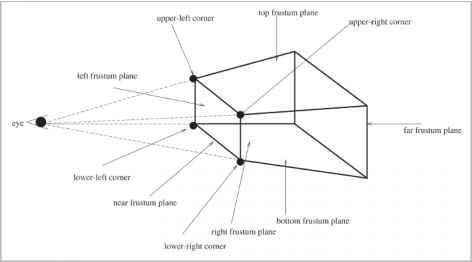
Bottom Frustum
-
Reviews
-
Popular Articles
- Request Queues Linux Kernel
- Kernel Control Paths Linux Kernel
- The ftpaccess File Linux Network
- Creating Reverse Mapping Linux
- The portmap Service Ubuntu Server
- Discovering Common Features
- Address 192168664 netmask
- Demand Allocation Paging Linux
- Figure 121 TCPIP Isoosi reference
- The Virtual Clock Linux Kernel
- Sending Packets to Network Card
- Doubly linked lists Linux Kernel
- Memory Barriers Linux Kernel
- Paging in Linux Linux Kernel
- The u Area Linux Communications
-
Categories
- Fedora Linux Secrets
- Red Hat Linux 7.2
- Linux Hardware
- Red Hat Enterprise Linux
- SUSE Linux Enterprise Server Guide
- Configuring with YaST2
- Linux Process Manager
- Ubuntu Server Administration
- SUSE Linux Enterprise Server Guide
- Fedora Basics
- SUSE Linux 9 Guide
- Linux Firewalls
- Oracle Dba on Linux
- Red Hat Linux Reference
- Linux Communications
- Linux Security
- Lotus Domino 6 for Linux
- Using Linux Commands
- Ubuntu for Business
- Ubuntu Linux Secrets
- Amazon EC2
- Red Hat Enterprise Guide
- Fedora 11 Red Hat Enterprise
- Working with Linux
- Ubuntu Administration
- Linux Performance
- Red Hat Linux Reference
- Linux Assembly Programming
- Fedora Linux Commands
- Linux Programming
- Embedded Linux Systems
- Mail Scanning Gateway