Red Hat Linux 7.2
Creating an Audio CD with cdrecord

You can use the cdrecord command to create either data or music CDs. You can create a data CD, by setting up a separate file system and copying the whole image of that file system to CD. Creating an audio CD consists of selecting the audio tracks you want to copy and copying them all at once to the CD. This section focuses on using cdrecord to create audio CDs. The cdrecord command can use audio files in .au, .wav, or .cdr format, automatically translating them when necessary. If you have audio...
Using telnet for remote login
Telnet is a service provided by many different types of computer systems to enable remote users to log in to their machines over TCP IP networks. The telnet command is the client program that you use to do the remote login. The most common way to use telnet is with a hostname. The following is a typical telnet session Last login Mon Dec 18 13 15 57 from pine mike maple mike This example shows what happens when the telnet command is used to log in from a computer named pine to a computer named...
Configuring your sound card
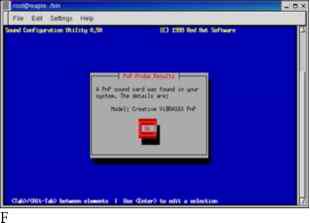
Before you can use sound on your Red Hat Linux system, you need to install your sound card and connect the speakers. Red Hat Linux should detect this card when you install Red Hat Linux or when you reboot and install the proper driver. Drivers for many common sound cards are available when you first install Red Hat Linux. Earlier releases of Red Hat Linux did not have sound card devices built into the kernel, but the current release of Red Hat Linux automatically builds sound support into the...
Booting your computer with LILO
It is the program that can stand outside the operating systems installed on the computer so you can choose which system to boot. It also lets you give special options that modify how the operating system is booted. Note LILO has been replaced by GRUB as the default boot loader for Red Hat Linux. Unless you have explicitly changed your system to use LILO, you should be reading the GRUB section for boot loader information. If LILO is being used on your computer, it...
Changing the desktop
From the Control Center window, you can change the Background, Launch Feedback, Panel, Screensaver, Theme Selector, or Window Manager for your GNOME desktop. After you open the Control Center window, select one of those categories. Here are the preferences that you can change from each Background From the Background preferences, you can choose a single solid color, a two-color gradient (shading from top to bottom or left to right), or a pixmap image to use as wallpaper. If you choose a single...
Creating the Samba server configuration with SWAT
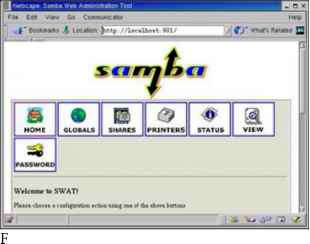
You can run the SWAT program, by typing the following URL from your local browser Instead of running SWAT from your local browser, you can also run the SWAT program from another computer on the network, by substituting the server computer's name for localhost. (To allow computers besides localhost to access the swat service, you must change or remove the only_from 127.0.0.1 line from the etc xinetd.d swat file and restart the xinetd service.) At this point, the browser will prompt you for a...
Partitioning with Disk Druid during installation
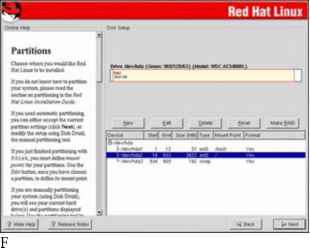
During a custom installation, you are given the opportunity to change how your hard disk is partitioned. Red Hat recommends using the Disk Druid. Figure 2-1 is an example of the Disk Druid screen from the Red Hat Linux Installation Guide. igure 2-1 Change disk partitions during installation using Disk Druid. igure 2-1 Change disk partitions during installation using Disk Druid. The Disk Druid screen is divided into two sections. The top shows general information about each hard disk and primary...
Starting runlevel scripts
As previously mentioned, the etc rc.d rc script is a script that is integral to the concept of run levels. Any change of run level causes the script to be executed, with the new run level as an argument. This simple yet powerful script is shown and discussed here rc This file is responsible for starting stopping services when the runlevel changes. It is also responsible for the very first setup of basic things, such as setting the hostname. Miquel van Smoorenburg, Now find out what the current...
Understanding dump levels
The dump command has the capacity to back up all files on a file system, or it can selectively back up only those files that have changed recently. The dump level parameter is used to specify this behavior. A dump level of 0 results in a full backup of all files on the file system. Specifying a higher number (1-9) backs up only those files that have been changed or added since the most recent dump of the same or lower dump level. I recommend you use dump levels to implement a full and...
Audio file conversion
If you have a sound file in one format, but you want it to be in another format, Linux offers some conversion tools you can use to convert the file. The Sox utility can translate to and from any of the audio formats listed in Table 8-1. Table 8-1 Sound Formats Supported by Sox Utility Table 8-1 Sound Formats Supported by Sox Utility 8SVX Amiga musical instrument description format. Apple IIc IIgs and SGI AIFF files. May require a separate archiver to work with these files. Sun Microsystems AU...
Using the Gnome Desktop Environment
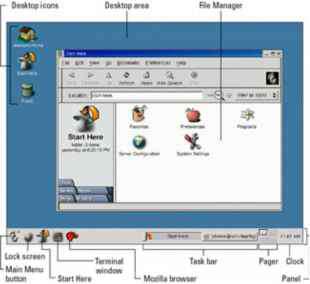
GNOME (pronounced guh-nome) provides the desktop environment that you get by default when you install Red Hat Linux. This desktop environment provides the software that is between your X Window System framework and the look-and-feel provided by the window manager. GNOME offers a stable and reliable desktop environment, with a few cool features built in. GNOME is not a window manager, so it must be used with a window manager to provide such things as window borders and window controls....
Reconfiguring Hardware with kudzu
When you add or remove hardware from your computer and reboot Red Hat Linux, a window appears during the reboot process advising that hardware has either been added or removed and asking if you want to reconfigure it. The program that detects and reconfigures your hardware is called kudzu. The kudzu program is a hardware autodetection and configuration tool that runs automatically at boot time. If you like, you can also start kudzu while Red Hat Linux is running. In either case, here is what...
Using TCP wrappers
Completely disabling an unused service is fine, but what about the services that you really need How can you selectively grant and deny access to these services In previous versions of Red Hat Linux, the TCP wrapper daemon (tcpd) was used to facilitate this sort of selective access. In the current version of Red Hat Linux, TCP wrapper support has been integrated into xinetd. Xinetd will look at the files etc hosts.allow and etc hosts.deny to determine when a particular connection should be...
Removing print jobs with lprm
Users can remove their own print jobs from the queue with the lprm command. Used alone on the command line, lprm will remove all the user's print jobs from the default printer. To remove jobs from a specific printer, use the -P option, as follows To remove all print jobs for the current user, type the following The root user can remove all the print jobs for a specific user by indicating that user on the lprm command line. For example, to remove all print jobs for the user named mike, the root...
Gnome games
The Gnome games consist of some old text-based UNIX games, some card games, and a bunch of games that look suspiciously like games you would find on Windows systems. If you are afraid of losing your favorite applications (such as Solitaire, Freecell, and Minesweeper) when you leave Windows 9x 2000, have no fear. You can find many of them under Gnome games. Table 7-1 lists the games available by selecting Programs Games from the Main Gnome menu. Lets you select from among 28 different solitaire...
Civilization Call to Power
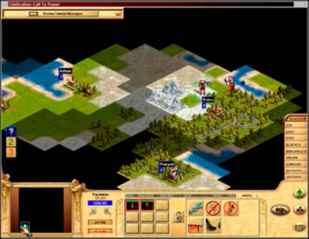
You can build online civilizations with Civilization Call to Power (CCP). Like earlier versions and public spin-offs (such as the Freeciv described earlier in this chapter), Civilization Call to Power for Linux lets you explore the world, build cities, and manage your empire. This latest version offers multiplayer network competition and extensions that let you extend cities into outer space and under the sea. CCP is produced by Activision (http www.activision.com ), although the Linux version...
The Packages
The packages contained on the two installation CD-ROMs are as follows 4Suite Contains Python programming tools for manipulating XML content and object databases. a2ps Contains tools for converting text and other types of files into PostScript output for printing. abiword Contains the AbiWord word processing application. adjtimex Contains the adjtimex command for regulating the system clock. alchemist Contains back-end configuration tools used by such features as printing, DNS, and Apache Web...
Using Scanners Driven by SANE
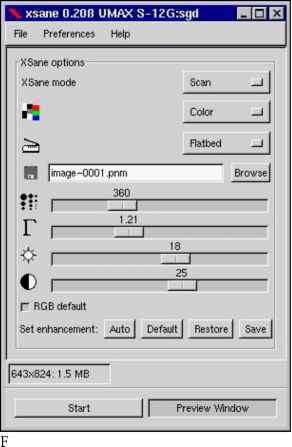
Software for using a scanner with Linux is being driven by an effort called Scanner Access Now Easy (SANE). This effort hopes to standardize how device drivers for equipment such as scanners, digital still cameras, and digital video cameras are created, as well as help simplify the interfaces for applications that use those devices. SANE is now included with the Red Hat Linux distribution. The sane-backends and sane-frontends packages are on the first Red Hat Linux installation CD (CD-1) that...
Using Anyware Office
The Anyware Office Suite for Linux from VistaSource (http www.vistasource.com ) contains a full set of publishing and office-productivity applications that run under Linux. Publishing applications that come with the suite include Anyware Words This WYSIWYG word processor contains a full set of document-publishing features for editing text and formatting pages. You can also import files from many other word processors, including Word (including Microsoft Office 97). Anyware Graphics You can...
Mailbombing
Mailbombing is the practice of sending so much e-mail to a particular user or system that the computer's hard drive becomes full. There are several ways to protect yourself from mailbombing. You can install an e-mail-filtering tool such as procmail or configure your sendmail daemon. Cross-Reference See Chapter 19 for a more complete description of sendmail. Blocking mail with Procmail The Procmail e-mail-filtering tool is installed by default with RedHat Linux and is tightly integrated with the...
Sendmail local info entries
The next entries in the sendmail.cf file appear under the local info heading. They enable you to enter configuration information that is specific to your local host computer. Here are the first lines you see in that local info file containing names of hosts for which we receive email Fw etc mail local-host-names The previous lines have similar functions. The Cwlocalhost line defines the class macro w, which contains a list of all possible hostnames given to the machine. This includes any DNS...
Understanding file permissions
After you've worked with Linux for a while, you are almost sure to get a Permission Denied message. Permissions associated with files and directories in Linux were designed to keep users from accessing other users' private files and to protect important system files. The nine bits assigned to each file for permissions define the access that you and others have to your file. Permission bits appear as rwxrwxrwx. The first three bits apply to the owner's permission, the next three apply to the...
Using the m4 macro preprocessor
Although using an m4 preprocessor macro file doesn't make configuring sendmail a simple task, it is at least considerably more intuitive. For example, the cryptic sendmail.cf file described in this chapter was generated by the following text file (the etc mail sendmail.mc file) dnl This is the sendmail macro config file. If you make changes to this file, dnl you need the sendmail-cf rpm installed and then have to generate a dnl new etc sendmail.cf by running the following command dnl dnl m4 etc...
Using Corel Word Perfect
At one time, WordPerfect was the world's most popular word-processing program. Although MS Word overtook WordPerfect a few years ago, WordPerfect is still very popular and is loaded with features. Corel Corporation (http www.corel.com ) now owns WordPerfect and continues its development. Fortunately for Red Hat Linux users, WordPerfect is available for Linux. Instead of having a lot of different applications for drawing and graphics editing, those features are built into the WordPerfect...
Using the LyX LaTeX Editor
You can start the LyX LaTeX editor with the lyx command (probably located in usr bin lyx). LyX comes with a lot of supporting documentation. Click Help to select a Tutorial, User's Guide, Reference Manual, or other information. To start your first document, I recommend that you select one of the templates provided with LyX. Templates are located in usr share lyx templates. To open a template, click File New from template, and select Templates. There are templates available for a letter,...
Running up2date
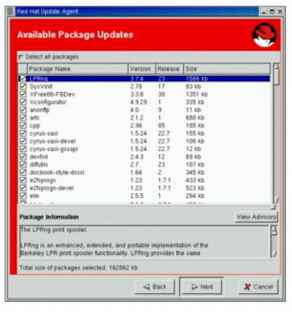
After you have registered your computer with the Red Hat Network, you can use the up2date command to find and install updates. As with rhn_register, you need root access to your computer to run up2date. This is because up2date needs permission to change configuration files and install packages. The up2date configuration file ( etc sysconfig rhn up2date) determines the behavior of up2date. In order to help you understand what up2date will do when you launch it, here are a few of the key settings...
Using Free and Commercial Word Processors
With the number of Linux systems growing daily, more and more commercial applications are becoming available for Linux. In the area of word processing, several strong products have already been developed to ease the transition to Red Hat Linux for less technical-oriented users. In Red Hat 7, a free word processor (ABIWord) was added to the distribution for the first time. This section describes the following free and commercial word processors for Red Hat Linux AbiWord The AbiWord word...
Understanding cron files
There are separate cron directories set up to contain cron jobs that run hourly, daily, weekly, and monthly. These cron jobs are all set up to run from the etc crontab file. The default etc crontab file looks like this The first four lines initialize the run-time environment for all subsequent jobs (the subshell in which jobs will run, the executable program search path, the recipient of output and error messages, and that user's home directory). The next four lines execute (as the user root)...
Supplying an initial tcshrc file
This following example .tcshrc file does basically the same thing as the preceding .bashrc example. However, this file (which is for the root user) has the additional task of setting the appearance of the command prompt User specific aliases and functions alias rm 'rm -i' alias cp 'cp -i' alias mv 'mv -i' setenv PATH PATH usr bin usr local bin set prompt ' n m c 1 Instead of using the export command to set environment variables, the tcsh shell uses the setenv command. In the example, setenv is...
Using the ssh and scp commands
Two commands you most likely want to use with the SSH service are ssh and scp. Remote users use the ssh command to login to your system securely. The scp command allows remote users to copy files to and from your system. Like the normal remote shell services, secure shell looks in the etc hosts.equiv file and in a user's .rhost file to determine whether it should allow a host to connect. It also looks in the ssh-specific files etc shosts.equiv and .shosts. Using the shosts.equiv and the .shosts...
Ripping CDs with grip
The grip window provides a more graphical method of copying music from CDs to your hard disk. You can then play the songs directly from your hard disk or burn them back on to a blank CD. You can open Grip from the Gnome menu by choosing Programs Multimedia grip or by typing grip from a Terminal window. Figure 8-10 shows an example of the Grip window. igure 8-10 Rip and play songs from the grip window. To rip audio tracks from a CD with grip, do the following 1. With the grip window open, insert...
Getting cdrecord for writable CDs
To write CDs with Red Hat Linux you need to install the cdrecord package. This package contains components such as the cdrecord, devdump, isodump, isoinfo, isovfy, and readcd command. The cdrecord package is included with the Red Hat Linux distribution. Note The cdrecord package requires that you use a SCSI CD drive. If you have an IDE ATAPI CD drive, which is a very popular device, you maymay need to configure that drive to do SCSI emulation. See Chapter 8 for a description of how to configure...
Using the Nautilus file manager

At one time, file managers did little more than let you run applications, create data files, and open folders. These days, as the information a user needs expands beyond the local system, file managers are expected to also display Web pages, access FTP sites, and play multimedia content. The Nautilus file manager, which is the default GNOME file manager, is an example of just such a file manager. When you open the Nautilus file manager window (from the GNOME main menu or by launching a...
Using mtools
Mtools are mostly DOS commands that have the letter m in front of them and that run in Linux (though there are a few exceptions that are named differently). Using these commands, you can easily work with DOS files and file systems. Table 5-5 lists mtools that are available with Linux (if you have the mtools package installed) Table 5-5 Mtools Available with Linux Table 5-5 Mtools Available with Linux The DOS attrib command, which is used to change an MS-DOS file attribute flag. The DOS...
Loki Software Games Demos
Loki Software's catalog of action and strategy games for Linux has grown significantly in the past few years. To encourage people to get to know their games, Loki offers a demo program that lets you choose from among more than a dozen of its games to download and try. The Loki Demo Launcher for downloading demos is available from the Demo Launcher page From that page, there are links to FTP sites from which you can download the Demo Launcher. Save the file to a directory (such as tmp loki) and...
Using the ghostscript and gv commands
To display PostScript or PDF documents in Red Hat Linux, you can use the ghostscript command. The ghostscript command is a fairly crude interface, intended to let you step through documents and interpret them one line at a time. (If the ghostscript command is not installed on your system, you can get it by installing the ghostscript package from CD-1 that comes with this book.) You can display any .ps or .pdf file you happen to have on your computer. For example, if the vnc-doc package is...
Look at the ifcfgppp0 file
The ifcg-ppp0 file contains options that are passed to the pppd daemon for features that are negotiated with the remote PPP server. Most of the problems that can occur with your PPP connection result from getting some of these options wrong (particularly asking for features that the server can't or won't provide). Here is an example of the ifcfg-pppO file that you can use to connect to a Windows NT PPP server The device name is pppO (which is associated with the configuration file ifcfg-pppO)....
Sendmail options
The sendmail.cf file contains a long list of options that you can set for sendmail on your Red Hat Linux system. Option definitions start after the Options block. Here is an example of the beginning of the Options strip message body to 7 bits on input O SevenBitInput False The SevenBitInput option indicates that sendmail should not clear the most significant bit from each byte of all mail messages. The EightBitMode option dictates how sendmail should handle message data that is not explicitly...
Taking screen captures
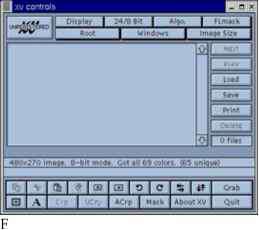
If you want to show examples of the work you do on Red Hat Linux, you can use the xv utility to capture screen images. This utility is particularly handy for those of us who write computer books. (Most of the images in this book were captured using the xv utility.) Because xv is shareware, to use it commercially you should send a 25 fee to the creator of xv (click the About XV button to find out about the license and where to send the fee). The xv utility is no longer part of the Red Hat Linux...
Playing MP3 with freeamp
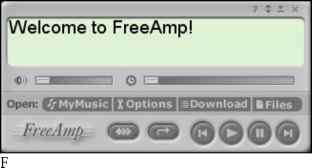
The freeamp MP3 player has some clever controls. You can click in the display area to cycle through the current time, remaining time, and total time associated with the music. Press and hold the left mouse button on dials on either side of the display, then move them to adjust the volume (left dial) or to seek a particular place in the song (right dial). Freeamp is not part of the Red Hat Linux distribution. The freeamp player is available from the FreeAmp Home Page (http www.freeamp.org ), or...
Recovering individual files
The restore command can also be used to recover individual files and directories. By using restore in interactive mode, you can type a series of restore commands to selectively restore files. To run restore in interactive mode, use the i parameter instead of r The restore command will then read the file index from the backup tape and present you with a restore prompt. At this prompt, you can type the commands that enable you to select which directories and files to recover. You can navigate the...
Supplying an initial bashrc file
By supplying your users with an initial .bashrc file, you provide them a starting point from which they can further customize their shell environment. Moreover, you can be sure that the file is created with the appropriate access permissions so as not to compromise system security. This script is, after all, run each time the user starts a new bash shell. So, security is a concern. It is also a good place to supply useful command aliases and additions to the command search path. Let us look at...
Obtaining the Crack package
For general information about the Crack software, read the Frequently Asked Questions Web page at Crack can be downloaded via FTP from the pub tools unix pwdutils crack directory at ftp ftp.cerias.purdue.edu . At the time of this writing, 5.0 is the current version of Crack. In this case, the file crack5.0.tar.gz is the one to download. If you find a higher version number when you look in the directory, download that newer version instead. Alternatively, you can download the file...
Chess games

Chess was one of the first games played on computer systems. While the game hasn't changed over the years, the way it's played on computers has. The set of chess programs that come with Red Hat Linux lets you play against the computer (in text or graphical modes), has the computer play against itself, or replays stored chess games. You can even play chess against other users on the Internet using Internet Chess Servers (ICS). The xboard program is an X-based chess game that provides a graphical...
Running the Crack command
Before you can run it, however, you must make your password file available in a format that Crack can read. The easiest way to do this is to run the shadmrg.sv script provided with Crack. You must be running as root to run the script, so use the su command to assume root privilege. The shadmrg.sv script is in the scripts directory within the primary Crack directory. It prints the merged password data to the screen, so you will need to redirect the output to a file...
Netscape Communicator package
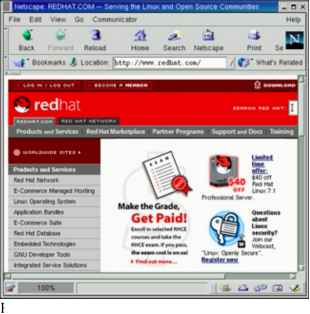
A few years ago, Netscape Navigator was overwhelmingly the most popular Web browser. Although Microsoft Internet Explorer (IE) has overtaken it on Microsoft operating systems, Netscape, and its open source cousin Mozilla, are still the most popular browsers on Linux and other UNIX systems. A lot of that has to do with the fact that there is no version of IE running on Red Hat or other Linux systems. (Don't hold your breath waiting for it, either.) Netscape Communicator is a repackaging of...
Running Security Audits with Tiger
By now you have observed that attending to the security of your Red Hat Linux box can be a time-consuming process. Fortunately, there are some tools that help automate the more routine tasks performed in crack-proofing your system. Tiger is one such tool. It performs security audits, automatically scanning your computer for bad configuration files, altered programs, and other potential security problems. It looks for weaknesses in all the following Specific file and directory access permissions...
Using the Red Hat Network
Once you have an account with Red Hat Network, you can log in to the Red Hat Network site and take advantage of the services it offers. As noted earlier, each registered user is entitled to register one computer to receive automatic updates. Other services that you receive by simply registering with the Red Hat Network Web site include Viewing complete listings of available errata, including security, bug fix, and enhancement alerts. Separate errata listings exist for each Red Hat Linux...
Permanently changing boot options
You can change the options that take effect each time you boot your computer by changing the GRUB configuration file. In Red Hat Linux, GRUB configuration centers around the boot grub grub.conf file. The boot grub grub.conf file is created when you install Red Hat Linux. Here is an example of a grub.conf file. grub.conf generated by anaconda Note that you do not have to rerun grub after making NOTICE You have a boot partition. This means that all kernel and initrd paths are relative to boot ,...
Configuring systemwide shell options
Allowing individually customizable shell startup files for each user is a very flexible and useful practice. But sometimes you need more centralized control than that. You may have an environment variable or other shell setting that you want set for every user, without exception. If you add that setting to each individual shell, the user has the ability to edit that file and remove it. Furthermore, if that setting must be changed in the future, you must change it in every single user's shell...
Using a shadow password file
In early versions of UNIX, all user account and password information was stored in a file that all users could read (although only root could write to it). This was generally not a problem because the password information was encrypted. The password was encrypted using a trapdoor algorithm, meaning the nonencoded password could be encoded into a scrambled string of characters, but that scrambled string could not be translated back to the nonencoded password. How does the system check your...
Using the r commands rlogin rcp and rsh
The rlogin, rcp, and rsh commands all use the same underlying security mechanism to enable remote login, remote file copy, and remote execution, respectively, among computers. If you use these commands, you will find that they are a quick and convenient way of exchanging information among a group of trusted computers. Caution The default security mechanism used by the r commands is not very secure. Don't use these commands if your computers protect national secrets. I recommend using these...
Xanim viewer
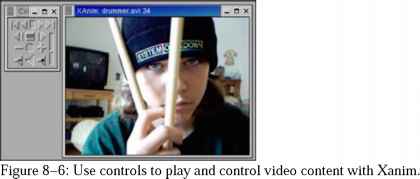
The Xanim program is a viewer that runs on your X desktop. It can play animation, video, and audio files. Until Red Hat Linux 7.1, the xanim package was part of the Red Hat Linux Powertools CD. Though there is no longer a Powertools CD, you can download the xanim package from any Red Hat FTP site. The types of media formats Xanim supports are Animations Supports FLI, FLC, IFF (with support for various compression, color cycling, and display modes), GIF87a (single and multiple image support) and...
Monitoring CPU usage with top and gtop
Start the top utility in a terminal window, and it displays the top CPU consuming processes on your computer. Every five seconds, top will determine which processes are consuming the most CPU time and display them in descending order on your screen. By adding the -S option to top, you can have the display show you the cumulative CPU time that the process, as well as any child processes that may already have exited, has spent. If you want to change how often the screen is updated, you can add...
Adding MIME types and handlers
With the AddType directive, you can enhance the MIME types assigned for your Apache Web server without editing the mime.types file. With the AddHandler directive, you can map selected file extensions to handlers that result in certain actions being taken AddType allows you to tweak mime.types without actually editing it, or to make certain files to be certain types. For example, the PHP 3.x module not part of the Apache distribution - see http www.php.net will typically use AddType application...
Managing xinetd services
There are a bunch of services, particularly Internet services, that are not handled by separate run-level scripts. Instead, a single run-level script called xinetd (formerly inetd) is run to handle incoming requests for a variety of network services. For that reason, xinetd is sometimes referred to as the super-server. The xinetd run-level script (along with the xinetd daemon that it runs) offers the following advantages Less daemon processes. Instead of one (or more) daemon processes running...
Configuring the INN server
The inn.conf file is where most of the general news server information is configured. For your INN news server to work, you must make several changes to this file. Most of the required changes are associated with identifying your server. However, you need to consider other changes that will have a major impact on how your server performs, what and how information is logged and stored, and the location of the directories that have newsgroup information. You add or change parameters in this file...
Managing files with the Konqueror File Manager
The Konqueror File Manager helps elevate the KDE environment from just another X window manager to an integrated desktop that can compete with GUIs from Apple Computing or Microsoft. The features in Konqueror rival those that are offered by those user-friendly desktop systems. Figure 4-5 shows an example of the Konqueror File Manager window. ix m ( 0 imimrtl imtt S f qui UOM ootflH MUbUll 9 . atO m es h H ktn igure 4-5 Konqueror provides a network-ready tool for managing files. Some of...
Commands for handling attachments
The following commands are used for handling data so that it can be included in a mail message as an attachment. Attachments in UNIX systems were originally handled by uuencode format. Now most mail attachments are handled using MIME format with various encoding. Note Because newer graphical mail programs, such as Mozilla Mail and Netscape Messenger, can handle attachments automatically, it is inefficient to go through the trouble of using most of these commands. uuencode Used to convert a...
Format of the inittab file
The plain-text inittab file consists of several colon-separated fields in the format The id field is a unique identifier, one to four alphanumeric characters in length that represents a particular action to take during system start-up. The run levels field contains a list of run levels in which the command will be run. Common run levels are 0, 1, 2, 3, 4, 5, and 6 (s and S represent single-user mode, which is equivalent to 1). Run levels 7, 8, and 9 are not standard they can also be used as the...
The aliases file
A more flexible method of handling mail delivery (systemwide rather than being specific to one particular user) involves the etc aliases file, which is also a plain-text file. The aliases file (described earlier in the sendmail.cf section) contains a name followed by a colon, and then a user name, another alias, a list of addresses, a file, or a program to which mail will be delivered. The name on the left side of the colon (which can be a valid user name or just an alias) can then be used as...
Character Based Games
There aren't many character-based games delivered with the basic Red Hat Linux installation. If you are interested in trying some of the legacy UNIX games, some of which were created many years ago, you can install the bsd-games package (which is available from Red Hat FTP sites). The games that come in the bsd-games package include simple card games, shooting games, and adventure games. As previously noted, games are stored in the usr games directory by default, so you may want to add that...
Checking system load average with xload
One way of keeping an eye on general system performance is to open an xload window on your desktop and put it off in the corner somewhere. The xload window graphically represents the performance of your system. It periodically checks the load on the system and then charts demand on the system over time. By default, xload updates the display every 10 seconds. Scale lines on the window help you monitor when xload has exceeded certain limits. The label in the xload window shows the system name. By...
The xmame Gaming Emulator
Creators of gaming emulators set out to take games that were designed for home gaming consoles or arcades and have those games run on a computer. As a result, games that were created for gaming machines that are now outdated or broken can be resurrected on your home computer. A compilation of gaming emulators has been put together into one project called Multiple Arcade Machine Emulator (MAME). Nicola Salmoria started the MAME project in January 1997. There are now more than 100 contributors....
Running Xconfigurator
The Xconfigurator command can be used to set up the links and configuration files needed to run your graphical X desktop environment. It checks that the correct X server is installed and configures the etc X11 XF86Config file. The following is an example of an Xconfigurator session Type Xconfigurator from the shell prompt (as the root user). A welcome screen appears. Highlight the Ok button (using tab and arrow keys) and press Enter. Xconfigurator probes for your video card. If it finds one, it...
Understanding the XF86Config file
The XF86Config file (located in the etc X11 directory) contains definitions used by the X server to use your video card, keyboard, mouse, and monitor. In general, novice users should not edit this file directly, but rather, use Xconfigurator to change its contents. For some video cards, however, there is a need for some manual configuration to get the card working properly. The following is a description of the basic information contained in the XF86Config file Files section Sets the locations...
Cloning a directory with mirrordir
Now that you have mirrordir installed, you can use it to clone a directory. Suppose you have a second hard drive with a partition large enough to hold a copy of your home partition. Your first step is to create a directory to mount the partition on, and then mount it. Log in as root and type the following In this example, we are mounting the fifth partition of the second hard drive, hence the device name dev hdb5. The b refers to the second disk, and the 5 refers to the partition number. You...
MIDI audio players
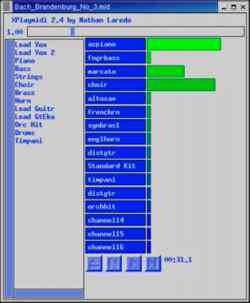
MIDI stands for Musical Instrument Digital Interface. MIDI files are created from synthesizers and other electronic music devices. MIDI files tend to be smaller than other kinds of audio files because, instead of storing the complete sounds, they contain the notes played. The MIDI player reproduces the notes to sound like a huge variety of MIDI instruments. There are lots of sites on the Internet for downloading MIDI files. Try the Ifni MIDI Music site (http www.ifni.com ), which contains songs...
Creating Doc Book Documents
You can create the documents in any text editor, using tags that are similar in appearance to HTML tags (with beginning and end tags appearing between less-than and greater-than signs). There are also word processing programs that allow you to create DocBook markup. The following procedure contains an example of a simple DocBook document that is produced with a plain text editor and output into HTML using tools that come with Red Hat Linux. Create a directory in your home directory to work in...
Creating a man page with Groff
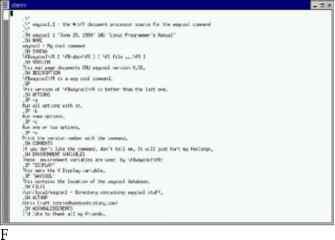
Before HOW-TOs and info files, man pages were the foundation for information about UNIX (and UNIX-like) systems. Each command, file format, device, or other component either had its own man page or was grouped on a man page with similar components. To create your own man page requires that you learn only a few macros (in particular, man macros). Figure 6-1 is an example of the source file for a fictitious man page for a command called waycool. igure 6-1 Simple markup is required to create man...
Reclaiming disk space from existing partitions
Like many people, your PC probably came with a Windows operating system already installed on the entire disk. Installing Red Hat, while keeping Windows on your hard disk, presents a problem. Red Hat Linux and Windows operating systems are typically put on separate disk partitions, and right now there is only one partition (and it isn't for Red Hat Linux). If you are in this predicament, but you have a lot of unused space in your Windows partition (at least 1GB or more), follow this procedure to...